
Visual Design
Image to Prompt Generator
Upload a picture and get back a written description of its subject, style, colors and composition, phrased as a prompt you can edit and paste into Stable Diffusion, Flux, Ideogram or any other image model.
- Free
- Two images a day
- No account needed
- Image
- The presenter portrait from our AI avatar page
- Came back
- 145 words under a bold label line
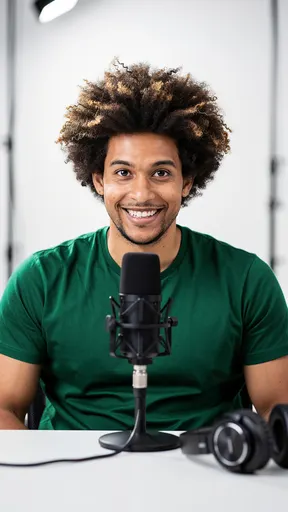
A young man sitting at a podcasting desk. He has a joyful expression, showcasing a broad smile. The man has voluminous, curly hair with hints of light brown highlights, and he is wearing a fitted green t-shirt. The scene should be bright and modern, featuring a sleek black microphone in front of him. Include a pair of professional headphones resting on the table beside the microphone. The background should be minimalistic with soft lighting. Use a color palette that combines warm tones with pops of green. The composition should be centered on the man, with the microphone and headphones as key elements.
Only an image that comes back with a prompt uses a try. Blipix does not keep the picture.
Generated prompt
The prompt will appear here
Upload a picture and press Generate Prompt. Expect a paragraph to trim, not a finished prompt.
Behind the button
What happens after you click Generate
Your picture is encoded
Your browser turns the file into text and sends it through our server to OpenAI. Keep it under 5 MB, because larger requests are rejected before the model sees them.
GPT-4o mini describes it
The model is asked for a prompt covering style, composition, colors and key elements. In our tests it wrote about 120 words of flowing sentences rather than a keyword list.
You clean it up
The answer can arrive with a bold label line and quote marks around it. Strip those, copy the rest, and edit it before pasting it into your image tool.
Why bother
Four jobs for a reverse-engineered prompt
Name a look you can see but not describe
You know you like a reference, but not why. The description hands you the words for it, such as "softly blurred studio background" or "warm tones balanced with green", which you can reuse in your own prompts.
Check what a model notices
If the description skips the thing you care about, an image model reading your own prompt will probably skip it too. That tells you which detail to state first and more plainly.
Keep a series on one look
Pull the style sentences out of the description and keep them as a block you paste under every new subject. A channel whose thumbnails and scenes share a palette is easier to recognize in a feed.
Brief a person, not just a model
The output is plain text, so it also works as a written brief for an illustrator or an editor: a neutral description of the reference that everyone on the project can read the same way.
Test run
Editing the Prompt You Get Back
We ran the presenter portrait from our AI avatar page through this tool. The answer opened with a bold label, then a quoted paragraph that included lines like “sitting in front of a professional microphone on a sleek white table” and “the background is a softly blurred modern studio setting.” Accurate, but written for a person to read. Here is how to turn that kind of output into a prompt that works.
Split subject from style
Read the description and mark two halves: what is in the picture (a young man, a microphone, headphones on a table) and how it looks (soft studio light, white backdrop, green and warm tones). Keep them as separate blocks. Swap the subject block to make something new in the same look, or swap the style block to redraw the same scene differently.
Cut the instructions to the model
Phrases such as "create an engaging portrait" or "the overall composition should convey" tell the reader what to feel, not what to draw. Image models get little from them. Delete them and keep the concrete nouns, colors, materials and light sources.
Match the format your tool prefers
Newer models with large text encoders, such as Flux, cope well with full sentences. Many Stable Diffusion checkpoints were trained on short, tag-style captions and often respond better when you rewrite the description as a comma-separated list, most important terms first.
Set the frame for where it will be used
The description never mentions shape, so add it yourself: 9:16 for Reels and TikTok scenes, 16:9 for a YouTube thumbnail, 1:1 for a profile picture. Some tools take it as a parameter typed after the prompt, such as --ar 9:16; most have an aspect ratio setting next to the prompt box.
Describe a style, do not copy a work
Borrowing a general look, like soft watercolor washes or grainy 35mm film, is how styles spread. Feeding in a specific artist’s piece to clone it, or a real person’s face to recreate them, is where you run into rights problems. If you want a painted look for a video, a ready-made preset such as the watercolor style is the cleaner route.
Keep going
Related Tools
More Blipix tools that pair well with this one.
- Video Creation
AI Avatar Creator
Make a portrait talk.
- Social Media
Instagram Caption Generator
Post text for your image.
- Content Planning
Faceless Video Ideas
Topics for your next video.
- YouTube Tools
YouTube Title Length Checker
Count a title against a 55-character guideline.
- Content Creation
Faceless Script Generator
Draft a narration script.
- Video Creation
AI Reels Maker
Vertical videos for Instagram.
FAQ8 answers
Frequently asked questions
Straight answers to the questions we hear most.
From one reference to a whole video
Choose an art style, add your style notes as image guidance, and Blipix draws a new image for every beat of your script.
- Script
- Voiceover
- Visuals
- Captions