You saw a TikTok video, scrolled past, and now you can't find it. Or you posted one from an app and it isn't on your profile. Either way, TikTok documents several ways to get back to a video.
This guide covers TikTok's own tools as of November 2026, then why a post made through an app may not show up yet. TikTok moves menus around, so labels in your version of the app may differ.
A word on bias: Blipix is our product, an AI video tool that can post to TikTok. It does not search TikTok, so the first half of this guide is TikTok's own tools only.
In short
- You remember something: search for words from the caption, the sound, a hashtag or the creator.
- You liked or reposted it: check the Liked videos or Repost tab on your profile.
- A friend sent it: check your messages, including TikTok direct messages.
- You only watched it: request your TikTok data, which can include watch video history.
- It's gone: it may be deleted, private or filtered.
- You posted it from an app: wait a few minutes, then check privacy, account and post status.
Start with what you remember: TikTok search
TikTok search covers people, posts, sounds, hashtags and more, according to TikTok's Discover and search help page.
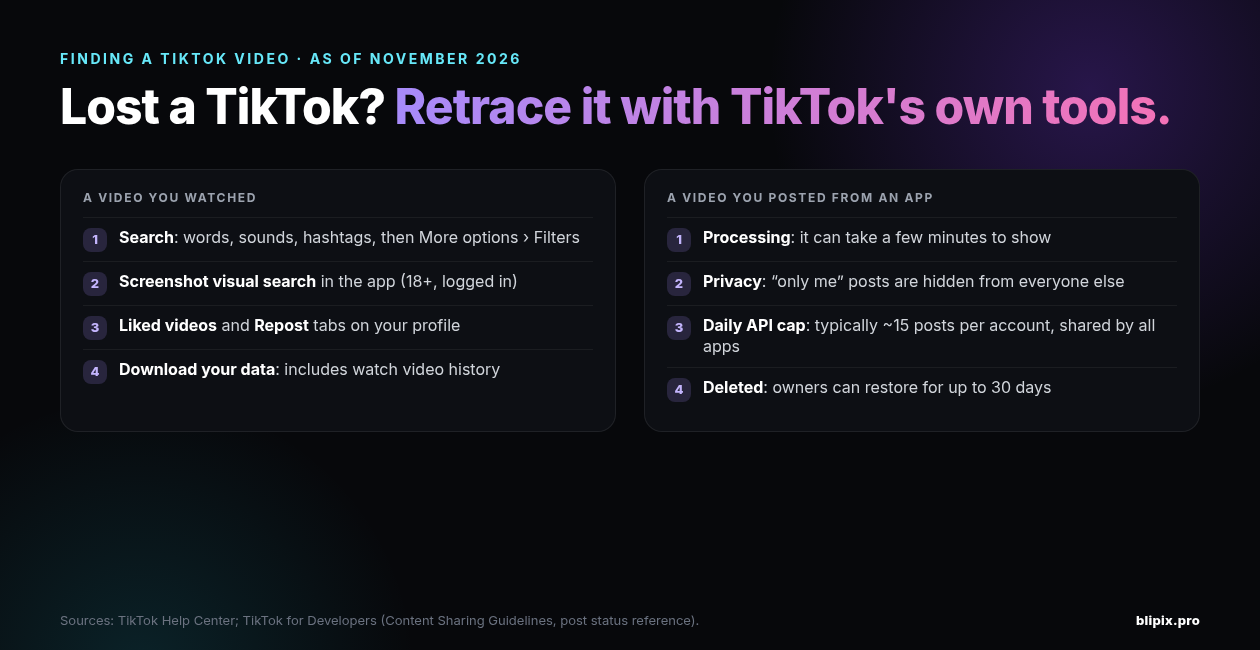
- In the TikTok app, tap the Search button at the top.
- Enter what you're looking for and tap Search.
- Check the Top tab first. TikTok says the most relevant results appear there.
To narrow the results:
- Tap the More options (…) button at the top.
- Tap Filters.
- Select filters and tap Apply.
The help page just says "Filters" and doesn't list them, so check what your version of the app offers.
Type what you remember: a phrase from the caption, the name of the sound, a hashtag or the creator's username.
If search won't find users or content at all, TikTok suggests switching between Wi-Fi and mobile data, clearing the app's video cache, restarting the app and your device, and updating TikTok. If you see an error message, it says to wait at least 24 hours before searching again.
Search with a screenshot
Screenshot visual search finds matching content and products from a screenshot you take inside the TikTok app. TikTok analyzes the image and identifies visually similar items. Results may include TikTok posts, e-commerce content, AI summaries and other matching media.
It's only available to people who are at least 18 and logged in. The steps:
- In the TikTok app, go to the post you want to search.
- Take a screenshot with your device.
- Tap the thumbnail to view visual search results.
A few things to know:
- It starts inside the app. TikTok's page doesn't describe uploading an old screenshot from your photo gallery.
- It finds similar content. The results won't necessarily include the exact video.
- Some posts are excluded. Depending on location, creators can choose whether a post can appear in visual search. It's on by default, and creators can turn it off before posting.
- Privacy: TikTok says screenshots stay on your device and it doesn't keep copies on its servers.
Check your own trails: likes, reposts and messages
If you liked, reposted or were sent the video, look here first.
Liked videos
From TikTok's help page on liking:
- In the app, tap Profile.
- Tap the Liked videos tab.
Liked videos are hidden from your profile by default. To change who sees them, go to Menu ☰ > Settings and privacy > Privacy > Liked videos.
Reposts
TikTok's repost help page puts it plainly: "You can find your reposted content on your profile under the repost tab."
Saw it because a friend reposted it? Reposts are labeled with the reposter's photo and nickname, so check that person's profile. On a public account anyone can see their reposts; on a private account only followers can.
Videos friends sent you
Go back to the conversation where your friend sent it. TikTok also says that when you share a post with a friend on another platform, TikTok sends it to them on TikTok too, if they tap the shared link and allow direct messages. So check your TikTok direct messages as well.
Go further back with your TikTok data file
If you only watched the video, request a copy of your data. TikTok says this data "may include but is not limited to your username, watch video history, comment history, and privacy settings," according to its help page on requesting your data.
- Go to Profile > Menu ☰ > Settings and privacy > Account > Download your data.
- Choose what to include and a file format.
- Tap Request data.
What happens next:
- It may take a few days to prepare the file. TikTok notifies you in the app.
- You download it from the Download data tab. The file is available for up to 4 days.
- The last 24 to 48 hours of some data categories may not be included, so something you watched yesterday may be missing.
- Some data may not be available, such as data that affects the privacy of others.
The help page doesn't say how far back watch history goes, so treat the file as a place to dig, not a guaranteed match.
When a video can't be found
It was deleted. A deleted post stays in TikTok's system for up to 30 days before it's permanently deleted, according to TikTok's help page on editing, posting, and deleting. During that time, the owner can restore it. TikTok doesn't document any way to view someone else's deleted video.
To restore your own post:
- Go to Profile > Menu ☰ > Settings and privacy > Activity center > Recently deleted.
- Tap the post.
- Tap Restore. Its comments and likes come back too.
It was a Duet or Stitch. If the original creator deleted their video and all its Duets and Stitches, you can't recover yours.
It's still a draft. Drafts sit in the videos tab on your profile and only become visible once posted. They may be removed if you reinstall TikTok or move the account to another device.
It's private. A post set to "only me" is visible only to its owner.
It was filtered. Content that's not appropriate won't be shown in search results, and TikTok may filter out posts that violate its Community Guidelines.
Where to look, side by side
Where to look for a TikTok video, as of November 2026
| Where | Best when | Limits | Source |
|---|---|---|---|
| TikTok search (Top tab + Filters) | You remember words from the caption, the sound, a hashtag or the creator | Inappropriate or guideline-violating posts may be filtered out | TikTok Help Center: Discover and search |
| Screenshot visual search | You're viewing a post similar to the one you want | 18+ and logged in; finds visually similar items; in some locations creators can opt posts out | TikTok Help Center: Discover and search |
| Liked videos tab | You liked it | Only videos you liked | TikTok Help Center: Liking |
| Repost tab | You reposted it, or someone whose profile you can see did | On a private account, only followers see reposts | TikTok Help Center: Repost |
| Download your data | You only watched it | May take a few days; available for up to 4 days; may lack the last 24 to 48 hours of some data | TikTok Help Center: Requesting your data |
| Recently deleted (your own posts only) | You deleted your own post | Up to 30 days; only the owner can restore | TikTok Help Center: Editing, posting, and deleting |
| Posting status in the app you used (creators) | You posted through a scheduler or AI tool | Public post ID only after public posting and moderation approval | TikTok for Developers: Get post status |
Posted from an app and can't find it?
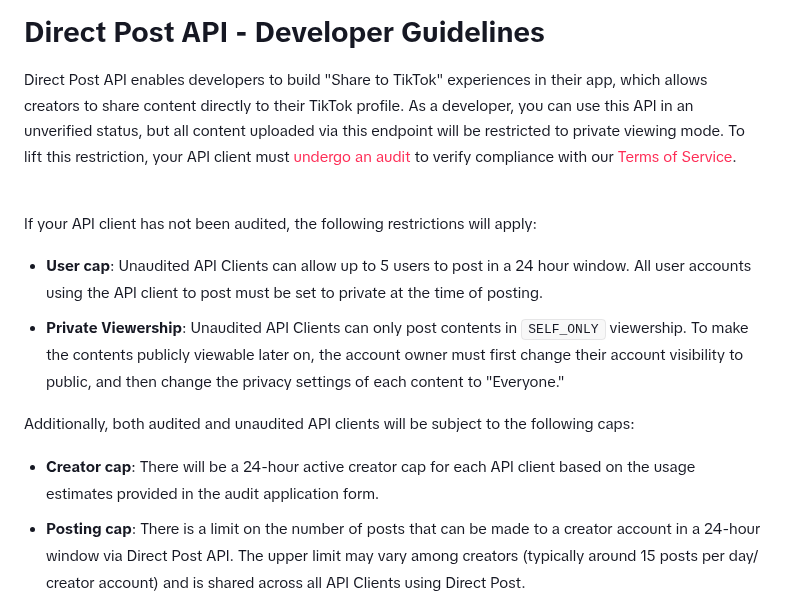
Some schedulers and AI tools post through TikTok's Content Posting API. TikTok's content sharing guidelines for developers explain most "where's my video?" moments.
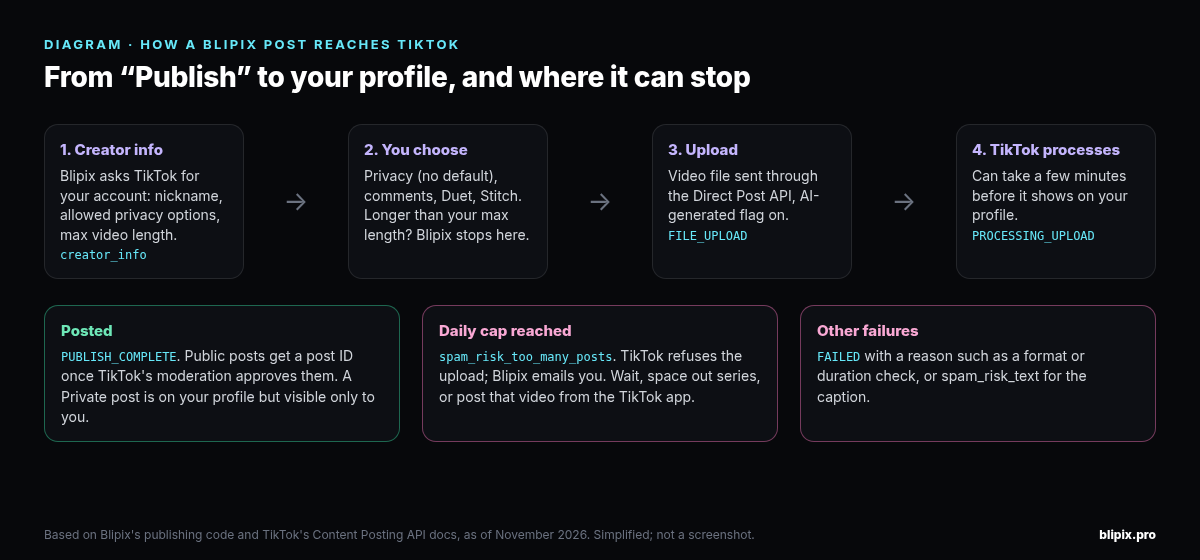
It's still processing. Apps must tell you that it may take a few minutes after publishing for the content to process and appear on your profile.
You chose the privacy setting. Apps must show the privacy options TikTok returns for your account, and you have to pick one yourself. There's no default. An only-me post is on your profile, but nobody else can see it.
Unaudited apps can only post privately. Apps that use Direct Post but haven't passed TikTok's audit can only post with only-me viewership, to accounts that are private at the time of posting, for up to 5 users in a 24-hour window. To make those posts public later, switch your account to public, then change each post's privacy to "Everyone".
The daily cap is shared. TikTok limits how many posts can be made to a creator account through Direct Post in a 24-hour window. The limit can vary by creator, but it's typically around 15 posts per day. It's shared across all apps that use Direct Post.
The status tells you where the post is. Apps should check TikTok's status endpoint or handle webhooks so you can see where a post stands. TikTok's post status reference lists these statuses:
- PROCESSING_UPLOAD or PROCESSING_DOWNLOAD: TikTok is still receiving the file (uploaded, or pulled from a URL).
- SEND_TO_USER_INBOX: a draft was sent to your TikTok inbox to finish in TikTok's editor (upload-to-inbox flow only).
- PUBLISH_COMPLETE: for Direct Post, the content has been posted.
- FAILED: the post failed.
TikTok only returns a public post ID once a post is public and approved by moderation, so a post can be complete without a public link.
Fail reasons include file checks (format, duration, frame rate, picture size), plus:
- spam_risk_too_many_posts: the account made too many posts through the API in 24 hours. TikTok suggests: "Try to post the videos from the TikTok Mobile App."
- spam_risk_text: TikTok judged the description text risky or spammy, and says a retry should not be done.
Our checklist, whatever app you used:
- Wait a few minutes.
- Check the privacy setting you picked.
- Check that you posted to the account you think you did.
- Count your posts from all apps in the last 24 hours, since the cap is shared.
- If it still fails, post that video from the TikTok app.
If your account is new, our guide to warming up a TikTok account explains why mass posting looks spammy.
What this means if you use Blipix
Blipix is an AI video tool that makes the script, voiceover, visuals and captions. On paid plans (see pricing), it can publish to TikTok from the editor or post a series on a schedule.
Blipix posts through TikTok's Content Posting API (Direct Post) by uploading the video file. It doesn't use the upload-to-inbox flow, so no draft is waiting in your TikTok inbox. Our TikTok API disclosure explains how we use TikTok's APIs.
- Privacy is what you picked. Blipix asks TikTok for your creator info and shows TikTok's privacy options for your account (Public, Friends, Private), with none selected. TikTok gets whatever you pick. Private means TikTok's SELF_ONLY: the video is on your profile, but only you can see it. Friends and other accounts won't find it in search. The rest of the publish window is described on our TikTok video page.
- Videos that are too long don't post. Blipix stops a post if the video is longer than the maximum duration TikTok returns for your account.
- Give it a few minutes. The editor tells you: "After publishing, it may take a few minutes for your content to process and be visible on your profile."
- The daily cap applies. If TikTok rejects an upload with spam_risk_too_many_posts, we email you ("TikTok Daily Post Limit Reached"). The video itself is fine. The email suggests spacing out series that post to the same account, waiting 24 hours for the limit to reset, downloading the video from Blipix and uploading it in the TikTok app, or posting less often (say, every 2 days). Series auto-posts use the same upload path, so they count toward the cap too.
Every TikTok post from Blipix is sent with TikTok's AI-generated content flag on, and our post on labeling AI-generated videos covers that.
Found it? Before you reuse it
TikTok's "Save video" option only appears on posts where the creator turned on download permissions.
Planning to post it again? TikTok's developer guidelines (linked above) say posting apps are meant to help "authentic creators to post original content." They list "an app that copies arbitrary contents from other platforms to TikTok" as not acceptable.
For reusing clips and stories, see our post on Reddit story and gameplay videos.
FAQ
Can I find a TikTok video from a screenshot?
Partly. Visual search works from a screenshot taken inside the app, shows visually similar results, and is for logged-in users 18 or older.
Is there a TikTok search by description?
Type words from the caption, the sound or a hashtag into TikTok search.
Can I see a deleted TikTok video?
Only your own. You can restore it from Recently deleted for up to 30 days. TikTok doesn't document any way to see anyone else's.
Why does my scheduled TikTok post not show on my profile?
It may still be processing, be set to private, be on another account, or have failed (for example, on the daily cap).
How many videos can an app post to my TikTok per day?
TikTok describes a Direct Post cap that can vary by creator but is typically around 15 posts per day. The cap is shared across all apps that use Direct Post.