If you searched for an AI timestamp generator or "how to add chapters to YouTube", you probably need two things: the rules YouTube actually applies, and a reliable way to get the times right. This guide covers both, as of November 2026. Our sources are YouTube's and Google's own help pages. If a source doesn't say something, we don't say it either.
A note on bias: Blipix is our product, and the free AI YouTube generator on our site is ours too. We mention both where they're relevant, including where they fall short.
This article covers long-form, horizontal (16:9) videos only. Shorts are a different format (we have a separate tool for making Shorts), and we don't cover them here.
In short
- YouTube chapters come from one of two places: timestamps and titles you write in the description, or automatic chapters YouTube may generate.
- Your own list has to meet four rules. It starts at 00:00, it has at least three timestamps in ascending order, and no chapter is shorter than 10 seconds.
- Your chapters override automatic ones. Automatic chapters are on by default for new uploads, and you can opt out per video.
- Adding chapters is an Advanced feature. Channels with active strikes don't get chapters, and neither does content that may be inappropriate for some viewers.
- Google Search may use the same timestamps for "key moments". That's a possibility, not a promise.
- Corrections go in their own section, after the chapters.
- Take times from the final video, not from an AI tool's guesses.
- Blipix doesn't add chapters for you. You can paste a list into the description before posting, but watch where the hashtags land.
What YouTube chapters are
YouTube's Video Chapters help page says chapters break a video into sections, and each section has its own preview. YouTube's tips for video descriptions state the purpose plainly: chapters "help viewers skip to important parts of longer videos". YouTube also notes that chapters may appear in transcripts.
There are two kinds:
- Your own chapters. You add them for each upload by writing a list of timestamps and titles in the description.
- Automatic chapters. YouTube can generate them for eligible videos. If you add your own, yours win.
Chapters live in the description text, so it doesn't matter how that text gets there. The YouTube Data API documentation says you can create chapters by including formatted timestamps, such as 00:00, in the description. A list you type in YouTube Studio works the same way as a list a tool posts through the API.
We won't claim that chapters raise rankings, watch time or views, because none of our sources say so. Their documented job is navigation.
The four rules for manual chapters
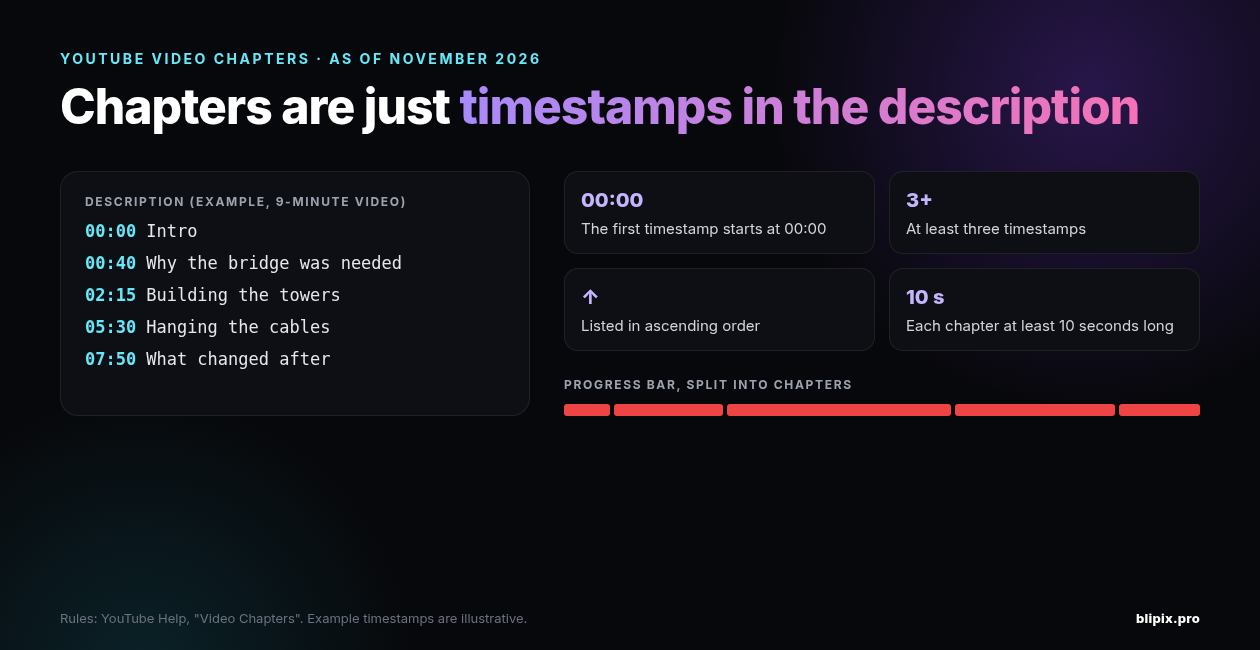
As of November 2026, YouTube's help page sets four conditions for a chapter list you write yourself:
- The first timestamp is 00:00. In YouTube's words: "Make sure that the first timestamp you list starts with 00:00." Your list starts at the very beginning of the video, not at your first "real" section.
- At least three timestamps.
- Ascending order. Each timestamp is later than the one above it. YouTube states rules 2 and 3 together: "Your video should have at least three timestamps listed in ascending order."
- At least 10 seconds per chapter. "The minimum length for video chapters is 10 seconds." A chapter runs from its timestamp to the next one, and the last chapter runs to the end of the video.
Here's an example list for a 9-minute explainer about building a bridge:
00:00 Intro 00:40 Why the bridge was needed 02:15 Building the towers 05:30 Hanging the cables 07:50 What changed after
It starts at 00:00 and lists five timestamps in order. The shortest chapter, the intro, is 40 seconds long. Each line holds one timestamp and its title. That layout also fits Google's key-moments guidelines, covered below.
The chapter list counts toward the description's 5,000-character limit. For the other limits, see our post on YouTube title, description and tag limits. For titles, there's also our title length checker.
Manual or automatic chapters
Manual chapters vs automatic chapters
| Manual chapters | Automatic chapters | |
|---|---|---|
| Who makes them | You, as timestamps and titles in the description | YouTube |
| How you add or turn them off | Write the list in the description, either in Studio or through any tool that posts it | On by default for new uploads; uncheck "Allow automatic chapters (when available and eligible)" per video, or change your upload defaults |
| Which wins if both | Yours override automatic chapters | Overridden by yours |
| Availability and eligibility | Needs access to Advanced features | Not every video is eligible, and eligible videos don't always get them |
YouTube says the chapters feature isn't available at all if the channel has any active strikes, or if the content may be inappropriate for some viewers.
Access: chapters are an Advanced feature
YouTube's page on intermediate and advanced features lists "Add chapters" among the Advanced features. If you don't have access yet, the Video Chapters page tells you to apply for Advanced features.
Channels with enough channel history are likely to qualify automatically. To unlock the features right away, you can verify your identity with a valid ID or a video, though YouTube notes that ID and video verification isn't available to all creators. Access isn't permanent, either: you have to keep following the Community Guidelines to keep it.
If you're still setting up a channel, start with our guide on how to start a faceless YouTube channel.
Turning automatic chapters off
The "Allow automatic chapters (when available and eligible)" box is checked by default for all new uploads. To opt out for one video, open that video's details and uncheck the box under Show more / Advanced settings. You can also change it in your upload defaults. YouTube says creators can always opt out in YouTube Studio.
Leaving the box checked doesn't guarantee anything. YouTube's wording: "Not all videos are eligible for automatic chapters, and not all eligible videos will have automatic chapters."
Why your chapters don't show
Go through these checks in order, starting with the list itself.
The list breaks a rule
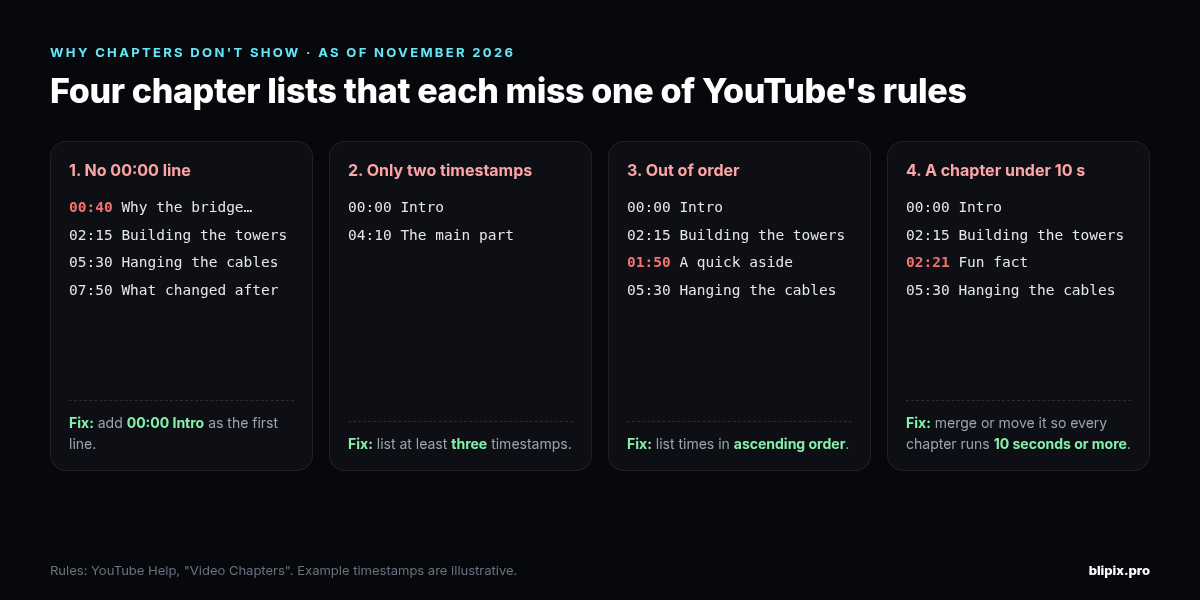
- No 00:00 line. A list that starts at 00:12 or 00:40 breaks the first rule, even if every other line is fine.
- Fewer than three timestamps. An intro plus one section is only two.
- Out of order. This is easy to cause when you re-cut a video and update one time but not the lines below it. Read the list top to bottom: each time must be later than the one before.
- A chapter under 10 seconds. Check the gap between every pair of timestamps. Also check the gap between the last timestamp and the end of the video.
The list isn't in the description, or only part of it is
- It's somewhere else. YouTube's instructions put the list in the description, so that's where it belongs.
- The description didn't save the way you think. Descriptions are capped at 5,000 characters and can't include invalid characters. If you pasted a list into a description that was already long, open the saved version and confirm the whole list is there.
The channel or video can't have chapters
- No access to Advanced features yet. See the access section above.
- An active strike on the channel.
- Content that may be inappropriate for some viewers.
You're expecting automatic chapters
- The box is unchecked, either for that video or in your upload defaults.
- The video isn't eligible. Or it is eligible and YouTube still hasn't generated chapters for it. YouTube says both happen.
- You added your own list. Your chapters override automatic ones, so yours are the ones you'll see.
Chapters and Google Search key moments
Google Search has "key moments", which let people move through video segments like chapters in a book. Google's video structured data documentation says Search tries to detect segments automatically. It adds: "We will prioritize key moments set by you, either through structured data or the YouTube description."
For videos hosted on YouTube, Google says it may turn on key moments automatically, based on the description. Its guidelines for timestamps you mark yourself:
- Use the format [hour]:[minute]:[second]. The hour is optional.
- Put the label on the same line as its timestamp.
- Put each timestamp on a new line.
- Give each label at least one word.
- Keep timestamps in chronological order.
Google notes that YouTube Chapters have additional guidelines, which are the four rules above. If your list meets those rules with one timestamp per line, it meets both sets.
Two caveats. First, Google says it may use these timestamps. It doesn't promise key moments will appear, and neither do we. Second, Google's opt-out, the nosnippet meta tag, works on pages on your own website. It doesn't apply to your YouTube videos.
Getting the times right
The rules are easy to check. The harder part is making every timestamp match the video. A list can pass all four rules and still send viewers to the wrong moment.
What works for us:
- Plan sections before you generate. If the script has clear sections, the chapter breaks are set before anything is rendered. Our faceless video script generator is one way to draft a script in sections. If you already have a draft, you can check it with the faceless video script analyzer.
- Take times from the final file. Watch the exported video, or the uploaded one in YouTube's player, and note the second each section starts. Don't estimate from your script or your editing timeline, because they can differ from the export.
- Redo the times after any re-edit. Trimming one scene shifts every timestamp after it.
- Check the result on YouTube. After upload, jump to each chapter and confirm it lands where it should.
Don't trust AI-made times
A text-based AI tool can't know when something happens in your video unless you tell it. That includes our own free AI YouTube generator. You paste a video link and, if you want, a summary. The tool asks an AI model (gpt-3.5-turbo) for three titles, a description and timestamps, and you get three runs a day. It can't watch the video: the link reaches the model only as text. If your summary has no times in it, the model invents plausible ones.
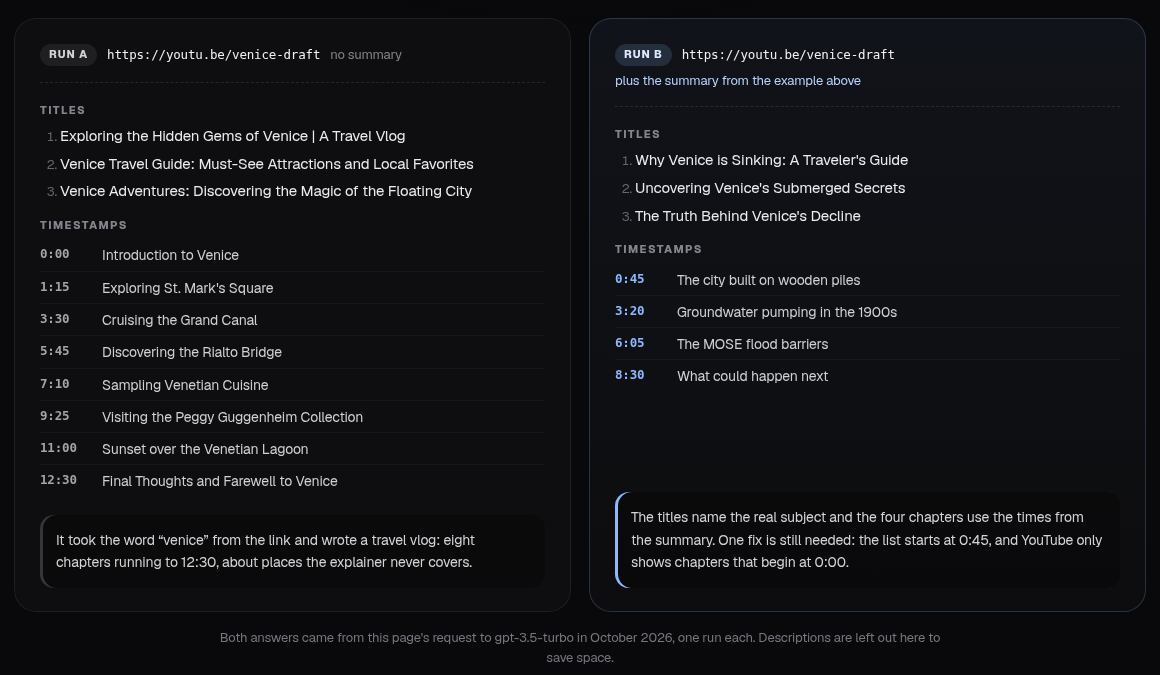
In the runs above, the link-only version invented eight chapters. When we gave it a summary with real times, it used them but left out the 00:00 line, which breaks the first rule. The fix is the same either way. Put real times in your summary, then check every line against the video and the four rules before you paste it.
Where corrections go
YouTube has a separate format for flagging mistakes in a published video, described on its Add video details page. Write "Correction:" or "Corrections:" in English, whatever language the video is in. Then put each correction on its own line: a timestamp and an explanation. On placement, YouTube says: "This section should appear after any video chapters."
Using the bridge example:
00:00 Intro 00:40 Why the bridge was needed 02:15 Building the towers 05:30 Hanging the cables 07:50 What changed after Corrections: 03:10 The narration says "north tower"; it should say "south tower".
What this means if you use Blipix
If you make long-form 16:9 videos with Blipix (up to 15 minutes, on Pro and Premium plans), this is how chapters fit in.
Blipix doesn't add chapters for you. When you post a video from the Blipix editor to YouTube, the publish dialog's Description box is prefilled for you. It holds the video's AI-written description, followed by its hashtags on the same line, separated by a space. You can edit that box before posting. Blipix sends the description to YouTube as is, so if you paste a chapter list in, YouTube treats it like any other description.
Watch the hashtags. If your chapter list is at the end of the description, the hashtags get added right after the last chapter title, on the same line. Your last chapter's label then includes the hashtags:
07:50 What changed after #engineering #history
To avoid this, put the chapter list above the description's last paragraph, or move the hashtags onto their own line.
Series auto-posting has no per-video chapter list. With series auto-posting, each video goes up with its AI description plus your series footer and hashtags. To add chapters to those videos, edit the description in YouTube Studio after upload. Or rely on YouTube's automatic chapters if the video is eligible. If you add chapters across a series, write each list from that video instead of reusing one template. We cover templated, repetitive descriptions in our post on YouTube's inauthentic content policy for faceless AI channels.
Use the editor to plan where chapters start. In the editor's Advanced view, the timeline shows a timecode (MM:SS) and a time ruler, and there's a "Split the scene at the playhead" button. Each scene card shows its duration, which you can set from 0.1 to 10 seconds. Because of the 10-second minimum, one chapter usually spans several scenes.
Account for the opening thumbnail card. The optional thumbnail card (Thumbnail tab, 0.3 to 3 seconds) plays before your content, and the editor timeline's timecode doesn't include it. So in the exported video, every moment is shifted later by the card's length. With a 2-second card, a section that starts at 02:15 in the editor starts at 02:17 in the export. Your 00:00 line stays as it is, and the card becomes part of the first chapter. Take the other times from the exported file or from YouTube's player, not from the editor timeline.
Posting to YouTube from Blipix needs a paid plan. See pricing for what each plan includes.
FAQ
Do I need a timestamp generator to add chapters?
No. You need the real times from your final video and a description that follows the four rules. Whatever drafts the list, check each line against the video.
Can I add chapters to a video that's already published?
Yes. Edit the description in YouTube Studio and add the list. The same four rules apply.
My intro is only 6 seconds. What goes at 00:00?
The first timestamp must be 00:00 and every chapter needs at least 10 seconds, so a 6-second intro can't be its own chapter. Give the 00:00 line the name of your first real section instead.
Do chapters count toward the description's character limit?
Yes. They're part of the description, which has a 5,000-character limit.
Do chapters help my video rank or get more views?
None of the official sources we used say so. Google may show key moments from your timestamps in Search, but it doesn't promise to.