If you searched for how much YouTube pays per view, you probably wanted one number: a rate you could multiply by your views.
YouTube doesn't publish one, and it doesn't really pay per view at all. Long-form earnings come from a share of ad revenue and a few other sources. What that works out to per 1,000 views differs from channel to channel and month to month.
This guide explains how the money works, using YouTube's own definitions, as of November 2026. YouTube updates its Help pages, so check the linked sources before you rely on any rule here.
A word on bias: Blipix is our product, an AI video tool that can make long-form videos and Shorts and post them to YouTube. The views calculator on our site is ours too. We make no earnings claims for either.
In short
- There is no fixed pay per view. Long-form ad money comes from Watch Page ads. YouTube shares it with creators in the YouTube Partner Program (YPP).
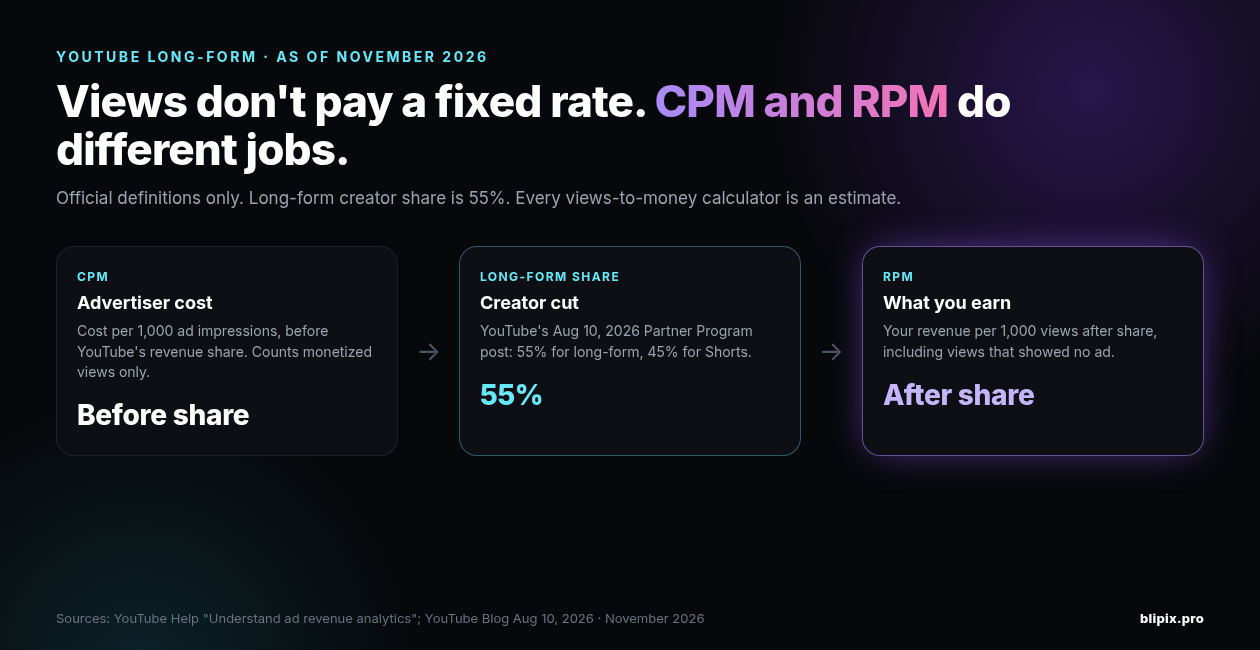
- CPM is the advertiser's number: the cost per 1,000 ad impressions, before YouTube's revenue share.
- RPM is your number: your total revenue per 1,000 views, after YouTube's share. It also counts views that showed no ad, so it's lower than CPM.
- The long-form creator share is 55%, per YouTube's August 10, 2026 Partner Program post. Shorts get 45%.
- No YPP, no ad revenue. From February 1, 2027, new applicants need to clear higher thresholds for ads and Premium.
- Public view counts aren't the views that earn.
- Every views-to-money calculator is an estimate, ours included. Once you're monetized, plan with your own RPM from YouTube Analytics.
CPM vs RPM, in YouTube's words
Most "pay per view" confusion comes from mixing up two metrics. YouTube's Help page on understanding ad revenue analytics defines both.
CPM (cost per 1,000 impressions) is how much advertisers are spending to show ads on YouTube. It includes only revenue from ads and YouTube Premium. It also counts only views from videos that monetized, meaning ads were shown.
RPM (revenue per mille) is how much money you've earned per 1,000 video views. It draws on several revenue sources, including ads, channel memberships, YouTube Premium revenue, Super Chat and Super Stickers.
YouTube puts the difference this way: "CPM is the cost per 1000 ad impressions before YouTube revenue share. RPM is your total revenue (after YouTube's revenue share) per 1000 views."
The page gives two reasons RPM is lower than CPM:
- RPM is calculated after YouTube's revenue share.
- RPM includes all views, including ones that weren't monetized.
The page's comparison table counts views differently by format: for Videos, RPM includes all views; for Shorts, all engaged views.
You may also see playback-based CPM — the cost for 1,000 video playbacks where an ad is displayed. Help notes it's often higher than CPM.
CPM vs RPM, side by side (YouTube Help, as of November 2026)
| CPM | RPM | |
|---|---|---|
| Focus | Advertiser | Creator |
| What it measures | Cost per 1,000 ad impressions | Your total revenue per 1,000 views |
| YouTube's revenue share | Before | After |
| Views counted | Only views from videos that monetized (ads were shown) | Long-form: all views, including unmonetized ones. Shorts: all engaged views |
| Revenue included | Ads and YouTube Premium | Ads, YouTube Premium, channel memberships, Super Chat, Super Stickers |
| Best used for | Understanding what advertisers spend | Planning your own income |
Where long-form money comes from
YouTube's Help page on how to earn money on YouTube describes advertising revenue as "Watch Page ads and Shorts Feed ads." Long-form earnings come from the Watch Page side. To earn any of it, you have to be in YPP and follow YouTube's monetization policies.
The page also lists Shopping, YouTube Premium revenue, channel memberships, Super Chat and Super Stickers, and Super Thanks. Each has its own rules, and we won't try to turn them into payout math.
How much reaches you? YouTube's August 10, 2026 Partner Program post gives the creator revenue share as 55% for long-form videos and 45% for Shorts. The post gives that split while describing Premium and Premium Lite. Creators share in a pool worth 30% of net subscription revenue for Premium and 60% for Premium Lite. From that pool, long-form gets 55% and Shorts get 45%. Our calculator page applies the same long-form figure to ads: "YouTube pays creators 55% of the net ad revenue on long-form videos."
Knowing the share still doesn't give you a per-view rate. You get 55% of revenue from ads that were actually served, at whatever advertisers spent. YouTube reports the result as CPM and RPM, and it doesn't publish a rate card.
RPM also isn't everything a channel can earn. Help says it leaves out:
- merchandise and the merch shelf
- brand deals and Creator Partnerships
- other indirect revenue, such as services, speaking or consulting
YPP thresholds as of November 2026 (and February 2027)
Until a channel is in YPP, its ad revenue is zero, however many views it gets. YouTube's YPP overview says the program allows revenue sharing from ads served on your content. It also gives greater access to resources and Creator Support.
To join, as of November 2026, a channel must:
- follow YouTube's channel monetization policies
- live where YPP is available
- have no active Community Guidelines strikes
- have 2-Step Verification on
- have access to advanced features
- have one active AdSense for YouTube account linked, or be ready to set one up in Studio
It must also meet one of two eligibility paths:
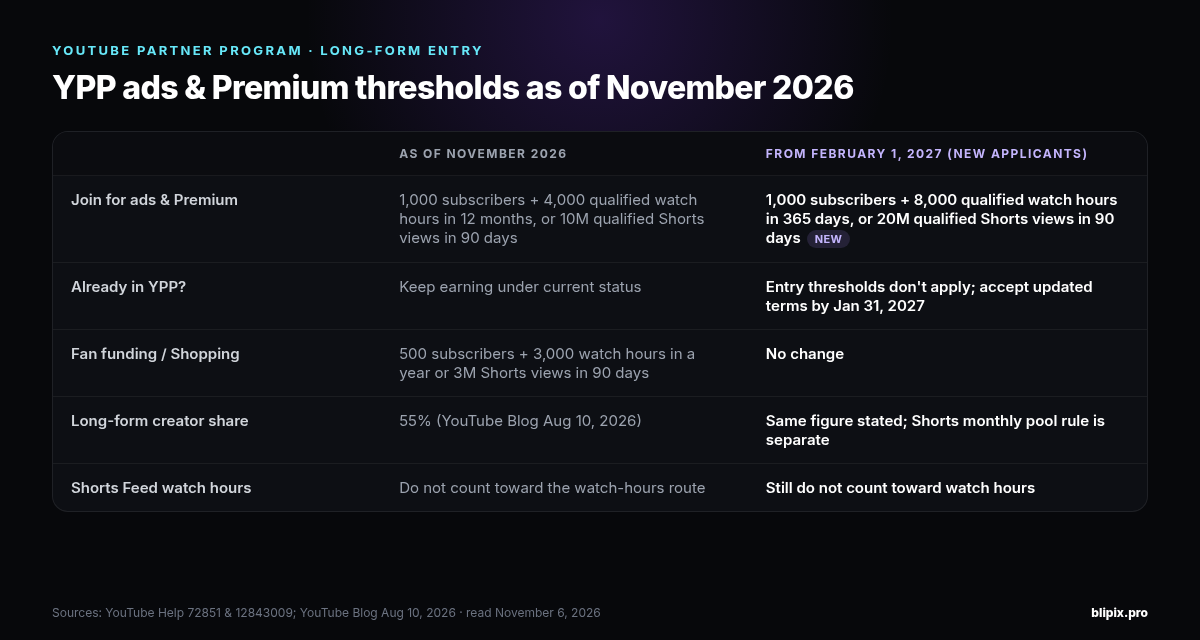
- 1,000 subscribers and 4,000 qualified watch hours in the last 12 months, or
- 1,000 subscribers and 10 million qualified Shorts views in the last 90 days.
A detail long-form creators often miss: watch hours from Shorts views in the Shorts Feed don't count toward the 4,000 watch hours.
Once you're in, you choose how to earn in YouTube Studio and accept the relevant module terms. The options include Watch Page Ads, Shorts Feed Ads, Memberships and Supers.
What changes on February 1, 2027
YouTube's Help page on changes to the YouTube Partner Program lists three updates from February 1, 2027:
- Premium Lite expands to where Premium is available.
- Shorts earnings change.
- Entry thresholds for YPP ads and Premium go up.
To keep fully monetizing, creators need to review and accept the updated terms in YouTube Studio by January 31, 2027.
New creators applying for ads and Premium from that date need 1,000 subscribers plus either:
- 8,000 qualified watch hours in the last 365 days, or
- 20 million qualified Shorts views in the last 90 days.
Channels already in the program keep their place: "If you are already in YPP, your status is not impacted by this update."
Thresholds for fan funding, Shopping and Creator Partnerships don't change. They stay at 500 subscribers plus either 3,000 qualified watch hours in the last year or 3 million qualified Shorts views in the last 90 days.
Staying active
As of November 2026, YouTube may turn off monetization on channels that haven't uploaded a video or posted to the Posts tab for 6 months or more. From February 1, 2027, a channel counts as active if it meets any one of these:
- 1,000 qualified watch hours in the past 365 days
- 1 million qualified Shorts views in the last 90 days
- 2 long-form videos or 5 Shorts uploaded every 90 days
If a channel drops below, Help describes an extended 90-day window to get back above the watch-hours or Shorts-views threshold.
Why "pay per view" calculators are estimates
A views-to-money calculator multiplies your views by a guessed rate, and the guess is the problem. YouTube's ad revenue analytics page doesn't publish an average RPM or a per-country rate. Every calculator has to make up its own.
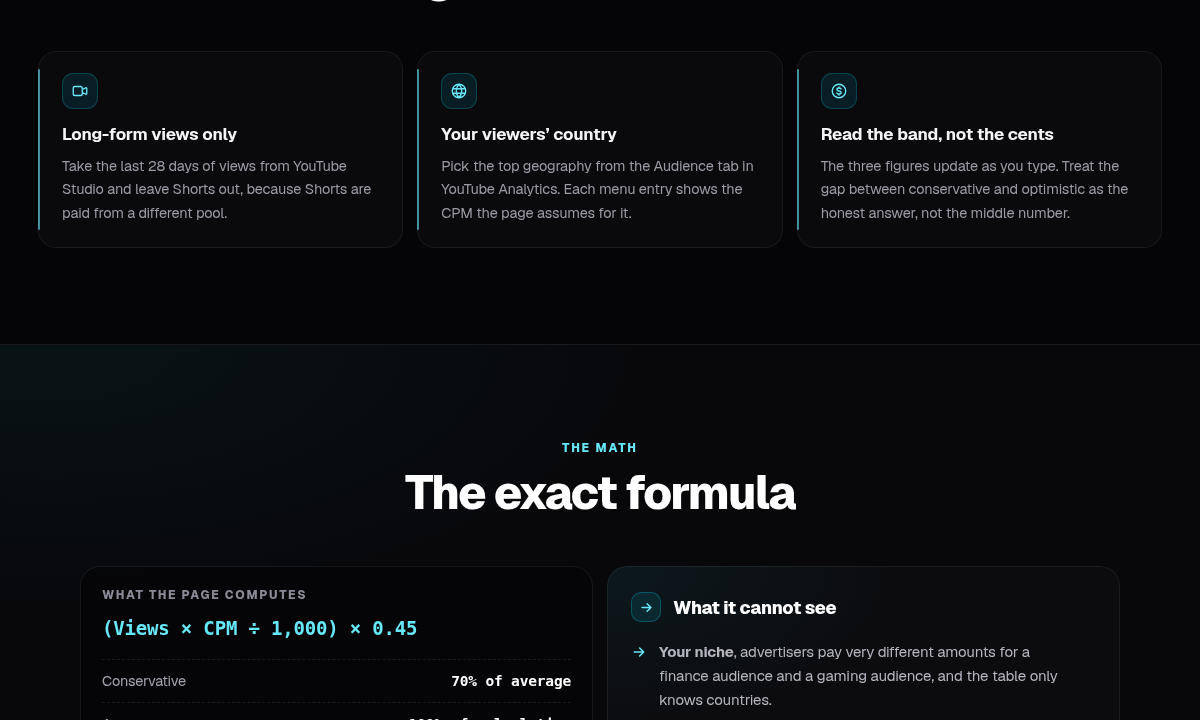
Ours is no exception. The YouTube views calculator on our site asks for your monthly long-form views and your audience's main country. It applies an assumed CPM and a fixed 0.45 multiplier, then shows a low, middle and high figure. It's free and runs in your browser. The page is upfront about its limits:
- Long-form views only. Leave Shorts out; the page says Shorts views earn far less than its figures.
- The 0.45 is not YouTube's split. It's a fixed multiplier set below YouTube's 55% long-form share, as a rough allowance for unmonetized views.
- The CPMs are assumptions. YouTube doesn't publish country CPMs, so the calculator uses its own figures. We don't repeat them here.
- Zero before YPP. Until you're in the program, ad revenue is zero, whatever your views.
As the page puts it: "A calculator with fixed CPMs cannot tell you what you will earn." Whether it's our tool or someone else's, treat the output as a rough range, not a forecast.
YouTube's own documentation shows why no fixed rate holds up:
Not every view shows an ad. For long-form videos, RPM counts views that weren't monetized. So it rises and falls with how many of your views carried ads.
Your public view count isn't the earning count. Beginning August 24, 2026, YouTube counts a view the moment a video starts to play, across Shorts, long-form and live. That's according to its Help page on how engagement metrics are counted. YouTube says this doesn't affect YPP. Earnings are still based on "engaged views" and "engaged watch hours," and eligibility on "qualified views." If you enter your public view count, the calculator starts from a different number than the one YouTube pays on.
Your settings matter. To improve RPM, Help suggests turning on monetization for all videos and turning on mid-roll ads. It also suggests features such as memberships and Super Chat, each with its own requirements. A calculator doesn't know which of these you've done.
Reading your own RPM in YouTube Analytics
Once you're monetized, retire the guesses. Your RPM reflects the total revenue YouTube Analytics reports for you, after YouTube's share.
We aren't giving click paths, because Studio layouts change. The ad revenue analytics Help page is the reference for what each metric means. Here's what it says about reading the number:
- RPM can fall without you losing money. If unmonetized views increase, RPM may go down even if revenue stayed the same.
- RPM can rise without more views. Memberships can push it up even when views are unchanged.
- CPM is higher for a reason. It's measured before YouTube's share and counts only monetized views, so it's not the number to plan with.
- Some income never shows up in RPM. Merch, brand deals and indirect revenue sit outside it, so track them separately.
To replace a calculator's guess with your own figure, our calculator page suggests a simple check. Divide your monthly revenue by your monthly views, then multiply by 1,000. Use revenue and views from the same month. Expect the result to change from month to month, for the reasons above.
Shorts vs long-form
Long-form videos earn from Watch Page ads, with a 55% creator share. Shorts earn through the Shorts Creator Pool, which pools Shorts Feed ad revenue. The creator share there is 45%, per YouTube's August 2026 post.
That's why comparing the two per view is misleading. On a long-form video, revenue comes from ads shown on your video. On a Short, earnings depend on your share of a pool.
Our companion post on how much YouTube Shorts pay covers the pool math, the music split and the 2027 Shorts earnings rule. One point matters here. YouTube says missing the new Shorts earnings threshold doesn't remove you from YPP. It also doesn't affect your other YPP earnings, including long-form.
If you're weighing platforms, our breakdown of TikTok's Creator Rewards covers the TikTok side.
What this means for faceless and AI channels
Getting views and being eligible to monetize are separate questions. A faceless or AI-made channel can collect plenty of views and still not be eligible.
YouTube reviews channels against its monetization policies, and repetitive, mass-produced or inauthentic content can fail that review. No calculator can model that outcome. If a channel isn't accepted, its ad revenue is zero, whatever an estimate said.
We cover the policy in depth in our guide to YouTube's inauthentic content policy for faceless and AI channels. Read it before you plan income around an AI channel.
What this means if you use Blipix
Blipix makes videos; it doesn't change how YouTube pays for them. We don't publish RPMs or earnings for Blipix-made videos.
What Blipix does. It handles script, voiceover, visuals and captions, in 9:16, 16:9 or 1:1. On Pro and Premium plans, it can make long-form videos up to 15 minutes as well as Shorts. Our AI long-form video generator page covers narrated videos for regular YouTube uploads, where 16:9 is the natural frame. For vertical video, see making YouTube Shorts. Plans are on our pricing page.

What Blipix doesn't do. On paid plans, Blipix can publish to YouTube through the YouTube Data API. The upload sets the title, description, channel, privacy status and comment setting. It also marks the video as not made for kids, so check that's right for your content. The upload has no monetization fields, so Blipix doesn't turn on ads or set any YPP option for you. Once your channel is in YPP, you make those choices in YouTube Studio.
Scheduling doesn't change the math. Blipix series can auto-post once a day, twice a day or three times a week through YouTube automation. A posting schedule doesn't change how YouTube calculates RPM or reviews channels. On originality, our automation page is specific: "Blipix generates new images and narration from your script, which is a fresh production, but only if the script itself is yours and not a rewrite of another creator's video."
FAQ
Does YouTube pay a fixed amount per view?
No. YouTube shares revenue from ads and other sources with channels in YPP. Your RPM depends on how many of your views were monetized and which revenue features you use. YouTube doesn't publish a standard rate.
Why is my RPM lower than my CPM?
RPM is calculated after YouTube's revenue share and includes views that weren't monetized. CPM is measured before YouTube's share and counts only views from videos where ads were shown.
How much do YouTube views pay in my country?
YouTube doesn't publish country rates or an average RPM. Any calculator with per-country figures, ours included, uses its own assumptions. Once you're monetized, your own RPM in YouTube Analytics shows what your audience actually earns you.
Do public view counts equal the views that earn money?
No. Since August 24, 2026, YouTube counts a view the moment a video starts to play. YPP earnings are still based on engaged views and engaged watch hours, and eligibility on qualified views.
When can a channel start earning ad revenue?
After it joins YPP. As of November 2026, that takes 1,000 subscribers plus the other requirements. You also need either 4,000 qualified watch hours in 12 months or 10 million qualified Shorts views in 90 days. From February 1, 2027, new applicants for ads and Premium need 1,000 subscribers plus either 8,000 qualified watch hours in 365 days or 20 million qualified Shorts views in 90 days. Channels already in YPP aren't affected.