If you searched for YouTube's tag character limit, description limit or title length, the short answer is three numbers: 100, 5,000 and 500. The longer answer is that each one is counted differently, and none of them tells you how much of your text a viewer actually sees.
This is a reference for those limits as of October 2026, drawn from YouTube's Help Center and developer documentation. On bias: Blipix is our product, and the free YouTube tools on our site are ours too. Where they fall short, we say so.
In short
- Title: 100 characters, no angle brackets, and viewers may only see the start. Our free YouTube title length checker explains where titles get shortened.
- Description: 5,000 characters per the Help Center, 5,000 bytes per the API. The lines above "Show more" do most of the work.
- Tags: 500 characters for the whole list, commas included. YouTube says they play a minimal role in discovery.
- Hashtags: up to three can show by the title. Past 60, YouTube ignores all of them.
- Shorts: the same limits. The difference is that the Shorts player shows the title over the video.
- Cut-off points: YouTube publishes no character count for where titles or descriptions get cut.
The limits side by side, as of October 2026
| Hard limit | How it's counted | What shows / where it gets cut | Shorts vs long-form | |
|---|---|---|---|---|
| Title | 100 characters | Characters; no < or > | Viewers may see only part; no published cut-off point | Same limit; the Shorts player shows the title over the video |
| Description | 5,000 characters (Help Center); 5,000 bytes (API) | Help Center: characters. API: bytes. No < or > | First lines show before "Show more" ("more" on mobile); how many is not published | Same field |
| Tags | 500 characters, all tags combined (API) | Commas count; a tag with a space also counts implied quotation marks | Set under "Show more" in the upload Details; minimal role in discovery | Same field |
| Hashtags | More than 60 and all are ignored | No spaces; title or description | Up to three can appear by the title | Same rules |
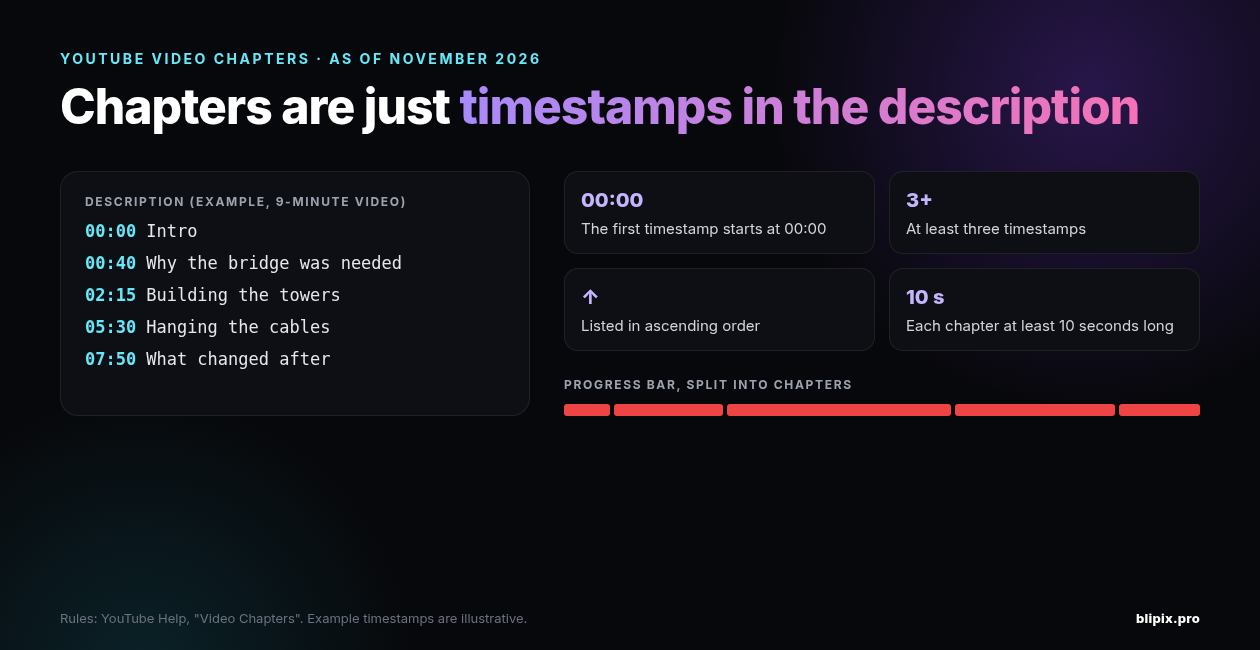
| Chapters | No separate cap stated; first at 00:00, three or more in ascending order, each at least 10 seconds | Timestamps inside the description, so they use its space | Built from those timestamps | Not covered here |
Titles: 100 characters, and the part people actually see
YouTube's Upload YouTube videos page says: "Video titles have a character limit of 100 characters and cannot include invalid characters." The YouTube Data API reference is more precise: a title may contain any valid UTF-8 character except < and >.
The 100 is a ceiling, not a target. YouTube's Thumbnail & title tips put it this way: "Be succinct. Viewers may only see part of your title. So aim to keep it short and put the most important words near the beginning. Save episode numbers and branding for the end."
The same page asks for accurate titles and suggests limiting ALL CAPS and emoji.
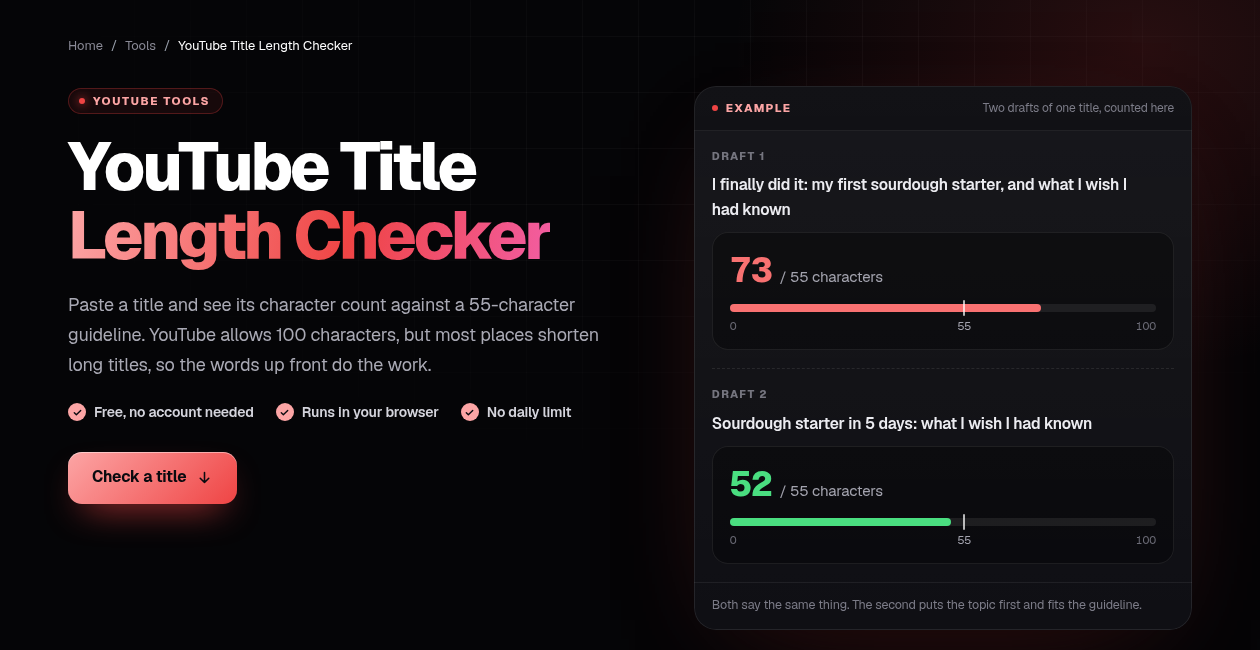
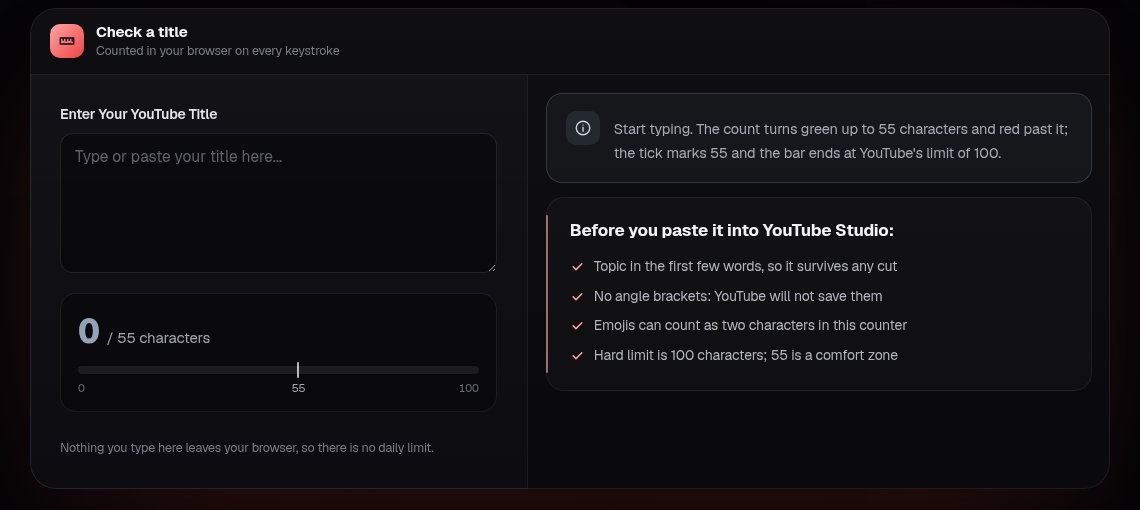
Our free title counter covers where titles get cut and how to tighten a long one, so we won't repeat that here. It counts against a 55-character guideline of our own, and its bar ends at YouTube's 100.
Descriptions: 5,000 characters, and the first lines do the work
The same upload page: "Video descriptions have a character limit of 5,000 characters and cannot include invalid characters." The API reference gives the field a "maximum length of 5000 bytes", with the same < and > exclusion.
Characters vs bytes
The Help Center says characters; the API says bytes. In UTF-8, a plain English letter takes 1 byte, accented letters and most non-Latin scripts take 2 to 3 bytes, and an emoji usually takes 4. So a description under 5,000 characters can be over 5,000 bytes when a tool sends it through the API.
We won't guess how YouTube Studio counts as you type. Either way, if you write with accents, in a non-Latin script or with lots of emoji, leave real margin under 5,000.
The part above "Show more"
YouTube's Tips for video descriptions splits a description into two parts: what shows before "Show more" on desktop ("more" on mobile), and the rest. It says to use the first few lines to describe the video. It doesn't say how many lines or characters that is; it suggests checking how your description appears in YouTube search, on the watch page and on various mobile devices.
The same page asks for a unique description for each video, with one or two main words in both the title and the description. Per the API reference, links in a description are clickable only if the channel meets requirements such as channel verification or having Advanced Features enabled.
If your faceless channel reuses templated descriptions, our post on YouTube's inauthentic content policy covers the wider issue of repetitive, mass-produced uploads.
Chapters live in the description
Video chapters come from timestamps in the description. The first must be 00:00, you need at least three in ascending order, and each chapter must be at least 10 seconds long. They count as description text.
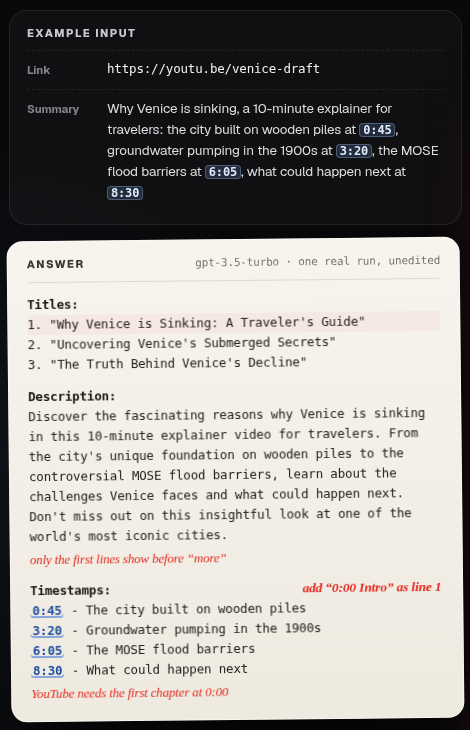
Our free AI YouTube generator drafts three titles, a description and chapter timestamps from a video link plus a summary you type, with three runs a day. It can't watch the video. If your summary has no timestamps, it can invent times, so check each one. The tool's own example answer even came back without the 0:00 line.
Tags: 500 characters, counted in an odd way
YouTube's page on adding tags gives no character number, but the API reference does: "The property value has a maximum length of 500 characters." That covers the whole list, and two rules make it fill faster than you'd expect:
- Commas count. The commas between tags count toward the limit.
- Spaces cost quotation marks. A tag containing a space is treated as if wrapped in quotation marks, and the quotes count. The API page's example: "Foo-Baz" counts as 7 characters, "Foo Baz" as 9.
On how much tags matter, YouTube is direct: "Tags can be useful if the content of your video is commonly misspelled. Otherwise, tags play a minimal role in your video's discovery." The tags page adds: "Your video's title, thumbnail, and description are more important pieces of metadata for your video's discovery."
Tags go in YouTube Studio, under "Show more" in the upload Details, not in the description: "Adding excessive tags to your video description is against our policies on spam, deceptive practices, and scams."
So add tags for common misspellings; otherwise spend the time on the title and the description's first lines.
Hashtags: where they show and the 60 cap
Hashtags are separate from tags. From YouTube's hashtags help page:
- Hashtags can go in the title or the description.
- "Out of all the hashtags you add to the video's description, up to three hashtags that are considered most engaging will appear by your video title."
- A hashtag has no spaces; join the words together.
- "If a video or playlist has more than 60 hashtags, we'll ignore each hashtag on that content." Over-tagging can also get a video removed from your uploads or from search.
- Misleading or unrelated hashtags can lead to removal.
- Ordinary descriptive tags and repetitive sentences in the description are still prohibited.
Read 60 as the point where every hashtag on the video stops working, not as an allowance.
Shorts vs long-form: what changes and what doesn't
What stays the same. The 100-character title limit (YouTube states it for Shorts uploaded from a phone too), the description and tag fields, and the hashtag rules.
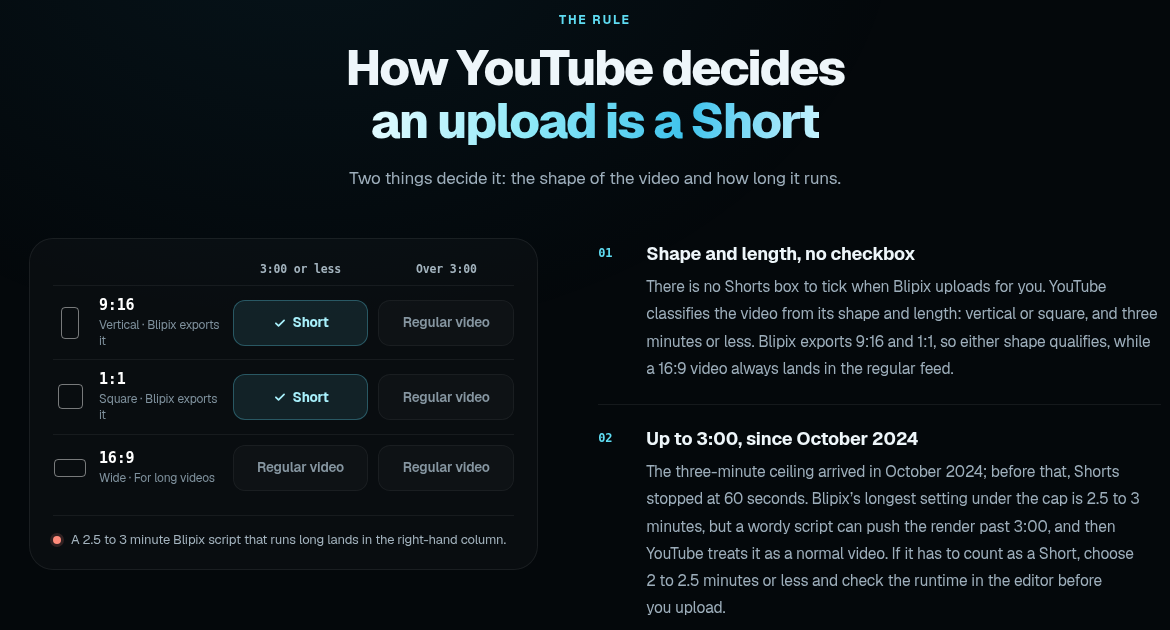
What makes a video a Short. Per Upload YouTube Shorts, a Short is up to 3 minutes long, with a square or vertical aspect ratio. There's no "Short" checkbox. YouTube decides from shape and length, as our page on making YouTube Shorts explains.
What's different.
- Shorts get a "Related video" field: a video from your channel that appears as a link in the Shorts player.
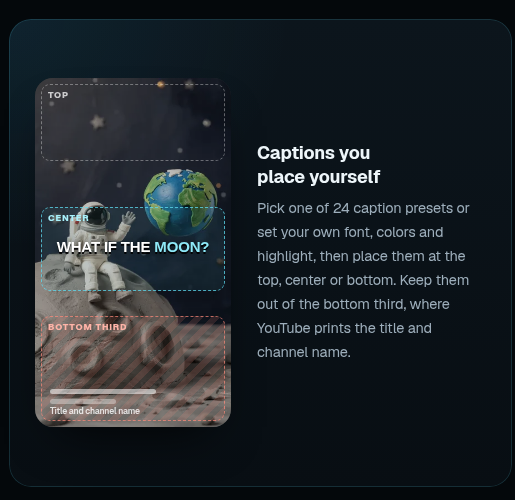
- The Shorts player shows the title over the video, where it competes with captions, which is why our Shorts page suggests keeping captions out of the bottom third. YouTube doesn't say how much of a Short's title shows.
On a Short, the title and the first seconds work together. Our guide to hooks for AI Shorts covers that opening, and our free YouTube Short script generator helps if you write the script first.
What YouTube does not publish
As of October 2026, YouTube publishes:
- no character count at which titles get cut in search, on the home feed, on mobile or in the Shorts player;
- no such count for descriptions, and no figure for how many lines show before "more";
- no "ideal" title length.
Numbers in third-party guides don't come from YouTube, so we don't repeat them.
Our counter does use one number, 55 characters. That's our approximation, not YouTube's. As that page explains, YouTube shortens titles by available width, not a fixed character count, so no single figure is exact. Our counter can also count an emoji as two characters.
A quick check before you hit Publish
- Title: 100 characters max, no < or >, important words first.
- Description: the first lines say what the video is about, it isn't a copy of your last one, and it stays well under 5,000. Leave extra margin for accents, non-Latin scripts or emoji.
- Chapters: 00:00 first, at least three, ascending, each 10 seconds or more.
- Hashtags: no spaces, relevant, nowhere near 60. Tags only for misspellings.
- AI disclosure: set it in YouTube Studio, not in the description. Our post on labeling AI-generated videos has the details.
What this means if you use Blipix
What Blipix writes
When Blipix generates a video from a prompt, the AI also returns a title, a description and exactly 4 hashtags. If you paste your own script, it writes them from that script. Our prompt asks for a title of 10 to 100 characters, a description of 20 to 500 characters without hashtags, and hashtags of 2 to 30 characters each. Those ranges are instructions to the AI, not enforced checks. The code only checks that the fields aren't empty and that there are exactly 4 hashtags. So a title can come back long enough to get cut in feeds.
You can edit the title and description in the editor's Details tab, where the hashtags also appear.
What it sends to YouTube
"Publish to YouTube" has Title and Description fields, both required. They're pre-filled with the video's title and with its description, with the hashtags added at the end, separated by spaces. Blipix posts through YouTube's Data API, so the 5,000-byte rule applies.
It sends the title, description, privacy setting, the comments setting, "not made for kids", and a custom thumbnail when there is one. Privacy can be public, unlisted or private; a series set to "friends" posts as unlisted. It does not send tags, set a category or set the altered or synthetic content disclosure. Nor does it add "#Shorts"; YouTube decides what's a Short from the video itself.
Series
In a series, each episode's description is the AI description, then an optional "Social Media Footer" you write once, then the hashtags. You can add "Standard Hashtags" to every episode on top of the 4 generated ones. Blipix limits that field to 10 tags with no spaces or punctuation, and merges duplicates. That's at most 14 hashtags per episode, far below YouTube's 60, and YouTube still shows only up to three by the title.
The AI receives up to the last 50 titles of the series and is told not to repeat them. Series can post once a day, twice a day or three times a week. See how many Shorts to post a day and the best time to upload Shorts.
Posting to YouTube, exporting and series require a paid plan; see pricing.
Caveats
- No tags. If your topic is often misspelled, add them in YouTube Studio after upload. Otherwise, per YouTube, they matter little.
- No length counter. The YouTube fields in Blipix have no character counter or length cap, and the AI's title can run to 100 characters. Check the front of the title yourself, in our counter or in YouTube Studio, which enforces its limits. That matters most for a series that posts unattended.
- Hashtags sit at the end of the description, so they don't use up the lines above "more" unless the description is very short.
- Studio-only settings. Blipix doesn't set the AI disclosure, "made for kids: yes", a category or localized titles; do those in YouTube Studio. If you need any of them on every upload, posting straight from Blipix is the wrong fit. Download the video, or upload it as private, and finish in Studio.
- Wrong pick entirely for channels that write every title and description by hand in Studio anyway, and for kids' content.
FAQ
What is the YouTube tag character limit?
500 characters for all tags combined, per the API reference. Commas count. So do the quotation marks YouTube counts around any tag that contains a space.
What is the YouTube description character limit?
5,000 characters per the Help Center, 5,000 bytes per the API. With accents, non-Latin scripts or emoji, you hit the byte limit before the character limit, so leave margin.
How long can a YouTube title be?
100 characters, with no < or >. YouTube doesn't publish where titles get cut, so put the important words first.
Are the limits different for Shorts?
No. A Short is up to 3 minutes and square or vertical, but its title, description, tags and hashtags follow the same rules. The differences are the "Related video" field and the title shown over the video.
How many hashtags should I use?
YouTube's hashtag page gives no target number. Up to three show by the title, more than 60 means all are ignored, and unrelated hashtags can lead to removal.