Cracking the Code on Instagram Reels: Best Length and Format for Virality in 2026
Analyzing why some Instagram Reels explode while others flatline comes down to two absolute metrics: length and formatting Canvas. If your Reels lose their audience in the first few seconds, you are actively signaling to the Meta algorithm that your page isn't worth distributing.
Retention is the primary ranking signal Instagram uses to push content to the coveted Explore and Reels shelves. When a viewer stays until the final frame or loops your video, your distribution velocity spikes.
In this comprehensive guide, we'll break down the retention thresholds dominating the 2026 algorithm, look at the dynamic layout elements that hold short-form attention, and explore how to use AI workspace tools like Blipix.pro to create viral vertical videos in minutes.
Why Reel Length Controls Your Algorithmic Reach
Reel duration and completion rates share a delicate relationship that many creators misunderstand. While short, snappy videos naturally achieve high completion rates because they are easy to finish, brevity alone no longer guarantees massive organic reach.
The Instagram algorithm balances completion percentage against total aggregate watch time. A 10-second Reel with an 80% completion rate yields 8 seconds of watch time. Conversely, a highly engaging 30-second video with a 50% completion rate generates 15 seconds of watch time per viewer. Because the latter keeps users on the app longer, Meta's system frequently pushes it further.
Through rigorous testing across diverse niches, the ideal strategic durations have split into clear categories:
The Entertainment & Trend Hook: 7 to 15 seconds. Optimized for rapid pacing, audio loops, and visual impact.
The Educational/Tutorial Narrative: 15 to 30 seconds. Tailored for high-density information delivery without artificial padding.

4 Format Elements That Maximize Video Retention
Length defines your baseline structure, but formatting dictates whether a user stays or scrolls. Incorporating these four core elements into your editing workflow will help protect your retention graphs from steep drop-offs.
1. The 1.5-Second Visual Pattern Interrupt
The modern user scrolls past content in milliseconds. Your hook must engage the viewer in the first 1.5 seconds—before they read your text caption overlay.
Weak hooks rely on slow camera pans or long-winded introductions. Strong hooks throw the audience directly into a high-stakes scene, use a striking visual transformation, or feature bold, dynamic text that creates immediate curiosity.
2. High Cut Frequency (The 3-Second Rule)
Short-form editing thrives on continuous momentum. Static framing that rests on the screen for longer than four seconds creates a natural exit point where viewers drop off.
Aim for a purposeful visual adjustment or clip cut every 2 to 3 seconds. This doesn't mean chaotic, random editing; it means using strategic jumps, close-up frame scales, b-roll inserts, or text pops to reset the viewer's attention span.
3. High-Contrast Text Burn-Ins
A massive percentage of mobile users scroll through social media with their device audio muted. If your video relies purely on spoken dialogue without text burn-ins, your narrative value disappears instantly.
Your on-screen captions must be scannable, high-contrast, and placed safely within the center-weighted safe zone so they don't get covered by Instagram's native UI icons.
4. Direct 9:16 Framing & The Safe Zone Rule
Never upload horizontal or poorly cropped square aspect ratios. Your video must occupy the full 9:16 vertical canvas.
When setting up your scenes, place your primary subject within the upper two-thirds of the grid. This ensures your main visual action stays perfectly legible and won't get blocked by the lower overlay text on Instagram's interface.
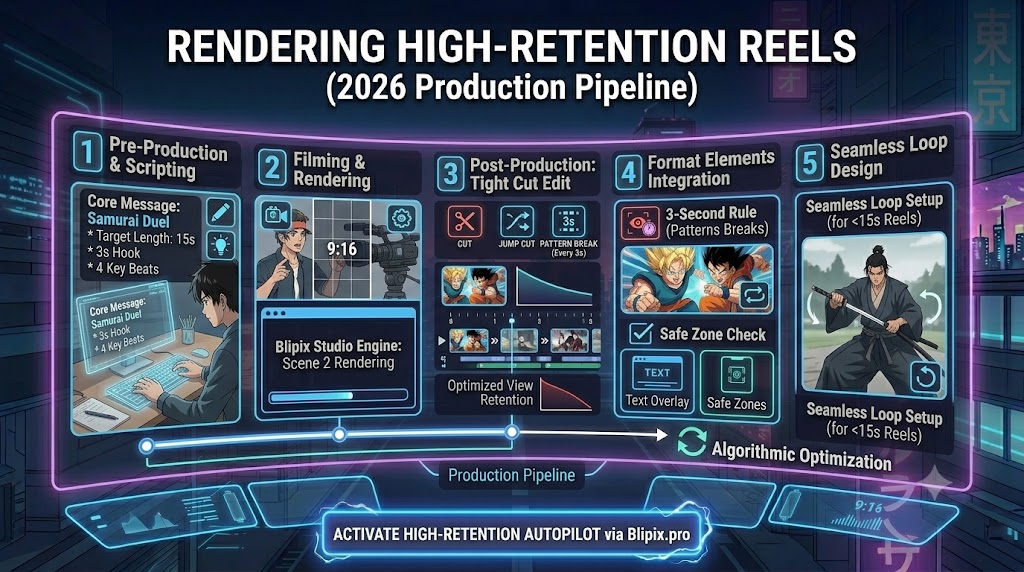
Step-by-Step Blueprint: Rendering High-Retention Reels
Building a high-retention reel requires a systematic approach to production. This actionable workflow is designed to streamline your planning and editing phases:
Step 1: Isolate the Core Message
Write down the singular takeaway of your Reel in one sentence. If an asset, phrase, or shot does not directly serve this core message, remove it from your timeline.
Step 2: Structure Your Key Beats
Script out your first three seconds word-for-word. Map out your next 3 to 4 sequential beats, noting exactly where your visual cuts, scene transitions, and caption updates will hit the screen.
Step 3: Produce Content with Multi-Take Energy
When recording or rendering assets, ensure your visual pace stays high. Gather excess b-roll footage so you can easily mask any slow explanations with engaging, contextual cutaways.
Step 4: Cut Pauses and Dead Space
Be ruthless during the editing process. Remove filler words, awkward breathing gaps, and slow frames. Keep the pacing tight and punchy from start to finish.
Step 5: Design a Seamless Loop Setup
For short Reels under 15 seconds, design your final frame to seamlessly flow back into your opening hook sentence. This encourages automated loop playbacks, which rapidly boosts your retention score.
Common Retention Killers to Avoid
- Slow Branding Intros: Starting a vertical video with an animated logo or a self-promotional greeting destroys your initial retention. Drop your audience straight into the value of the video first.
- Overpromising with Deceptive Clickbait: If your opening hook promises a massive revelation that your video never actually delivers, viewers will swipe away instantly in frustration, signaling to the algorithm that your page lacks credibility.
- Muffled or Distorted Audio Levels: Audiences will tolerate average video clarity, but bad audio quality will drive them away instantly. Ensure your primary voiceover track is perfectly crisp, clear, and mixed prominently above your backing track.
Scale Your Video Output via Blipix.pro
Consistently writing scripts, rendering high-end visual sets, animating subtitles, and editing audio tracks for a daily posting schedule can quickly lead to creator burnout. To maintain your audience's attention without drowning in manual post-production hours, you need smart creative automation tools.
This is where Blipix.pro changes the game for modern digital storytellers. Instead of forcing you to string together separate editing tools, Blipix serves as a complete, AI-powered creation workspace.
Whether you want to transform a text prompt into an episodic story or convert a pre-written script into high-retention vertical scenes, Blipix handles the heavy technical lifting. The platform automatically generates 9:16 stylized anime visuals, synchronizes your scenes with crisp AI voice narratives (powered by ElevenLabs), applies dynamic text overlays, and mixes background audio tracks perfectly.

Instead of building video content frame-by-frame over several hours, you can batch-produce a full week's worth of premium, high-retention Reels in a single afternoon. You can then use our Autopilot Direct Posting feature to automatically publish your content across your channels, completely hands-free.
Explore how our automation infrastructure compares by viewing our transparent pricing and feature matrix, discover advanced optimization blueprints across our creator resources and platform tools, or dive deep into the future of automated creation with our comprehensive review of the 10 best AI story video generators in 2026.