If you make AI-generated bedtime stories, picture-book cartoons, nursery-style songs or "family friendly" Shorts, YouTube asks you about every video: is it made for kids? The same goes for cartoon, anime, gaming or brainrot videos kids might watch. The answer isn't about whether a video is safe or cute; it's about whether it's directed at children.
This is a YouTube-centered guide to what YouTube's Help Center and the US rule behind it say as of November 2026. It isn't legal advice. YouTube's page on determining if your content is "made for kids" says "we cannot provide legal advice" and suggests counsel if you're unsure. The COPPA discussion is about US law, other countries have their own rules, and we did not review TikTok's or Instagram's child-safety rules for this article.
Why YouTube makes every creator answer the question
That page explains why: "Regardless of your location, we require you to tell us whether or not your videos are made for kids according to an agreement with the US Federal Trade Commission (FTC) and to help you comply with the Children’s Online Privacy Protection Act (COPPA) and/or other applicable laws." Getting it wrong "may result in consequences on YouTube or have legal consequences under COPPA and other laws." And "it is your legal responsibility to comply with COPPA and/or other applicable laws and designate your content accurately."
YouTube's page on how to set your channel or video's audience adds: "Even creators who don’t make content for kids need to set their audience."
YouTube uses machine learning to spot clearly child-directed videos and "may override your audience setting choice in cases of error or abuse," but warns: "Do not rely on our systems to set your audience for you". If YouTube overrides you, the video may show "Set to Made for Kids"; you can't change it, but you can appeal.
What US law looks at for "directed to children"
The FTC's Children's Online Privacy Protection Rule defines a "Website or online service directed to children" in 16 CFR 312.2. We're quoting the definition, not applying it to you. The FTC "will consider its subject matter, visual content, use of animated characters or child-oriented activities and incentives, music or other audio content, age of models, presence of child celebrities or celebrities who appeal to children, language or other characteristics of the website or online service, as well as whether advertising promoting or appearing on the website or online service is directed to children."
It also considers "competent and reliable empirical evidence regarding audience composition and evidence regarding the intended audience, including marketing or promotional materials or plans". And: "Child means an individual under the age of 13."
How it applies to an individual creator is a legal question. YouTube's Help page applies the same factors to videos and defines a US kid as anyone under 13; the age may differ elsewhere.
How YouTube decides whether a video is made for kids
A video is made for kids if "Children are the primary audience of the video," or if children aren't but the video is "directed at children because it features actors, characters, activities, games, songs, stories, or other subject matter that reflect an intent to target children." COPPA calls the second case "mixed audience" content, "a type of child directed content."
YouTube's factors, paraphrased:
- Subject matter, such as educational content for preschoolers
- Whether children are the intended (for example, per your metadata) or actual audience
- Child actors or models
- Characters, celebrities or toys that appeal to children, "including animated characters or cartoon figures"
- Language meant for children to understand
- Activities like play-acting, simple songs or games, or early education
- Songs, stories or poems for children
- Other evidence about your audience
- Whether the content is advertised to children
"Just because your content may include some of these factors does not automatically mean it’s made for kids." Nor is a video necessarily made for kids just because "It’s safe or appropriate for everyone to watch (aka it’s “family friendly”)", because "It covers an activity that’s traditionally associated with children", or because "Children may incidentally see it". YouTube's general-audience examples include "Animated content that appeals to everyone" and "A gaming video that features adult humor." And "Content that contains sexual themes, violence, obscene, or other mature themes not suitable for young audiences is likely not made for kids."
YouTube Analytics "is not designed to help determine if your content is child directed." YouTube's made for kids FAQ adds: "Adding a disclaimer stating that your content is meant for 13+ audiences doesn’t mean that the FTC will automatically deem your content as not made for kids." The FTC weighs it against other factors.
Our reading: for an AI-generated picture-book bedtime story or a nursery-style song with a friendly narrator, the factors point strongly toward made for kids. For an anime-style or horror story aimed at teens, they don't. Cartoon art alone doesn't decide it, so we'd decide the audience before the art style. And "family friendly" isn't a setting; for a video, YouTube only offers yes or no.
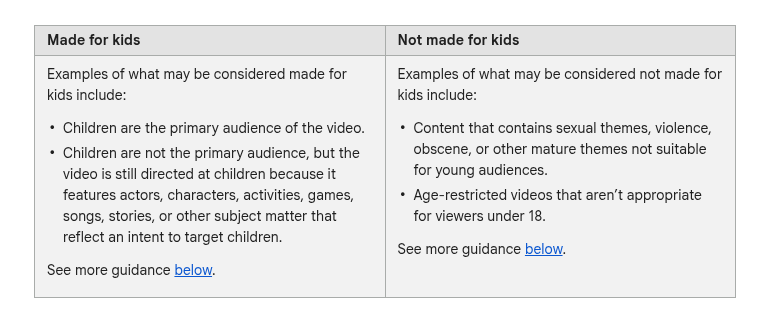
Cropped screenshot of YouTube's public Help Center page "Determining if your content is “made for kids”", taken November 18, 2026.
Side by side: five AI video formats and the factors
Our reading of YouTube's published factors, applied to hypothetical formats, not real videos. It isn't a ruling.
| Hypothetical format | What the factors suggest | Why (YouTube's factors) |
|---|---|---|
| Bedtime story with picture-book art and a calm narrator | Likely made for kids | A story for children, characters that appeal to children, language meant for children |
| Nursery-style sing-along song | Likely made for kids | A song for children; simple songs appeal to children |
| Cartoon-style comedy aimed at teens and adults | Judgment call: decide from intended audience and evidence, ask counsel if unsure | Animated characters are a factor, but YouTube lists animated content for everyone as general audience |
| Anime or horror story with violence or mature themes | Likely not made for kids | Violence or other mature themes make content likely not made for kids |
| Gaming clip with adult humor | Likely not made for kids | Listed as a general-audience example, absent signs of targeting kids |
What switching on "made for kids" turns off
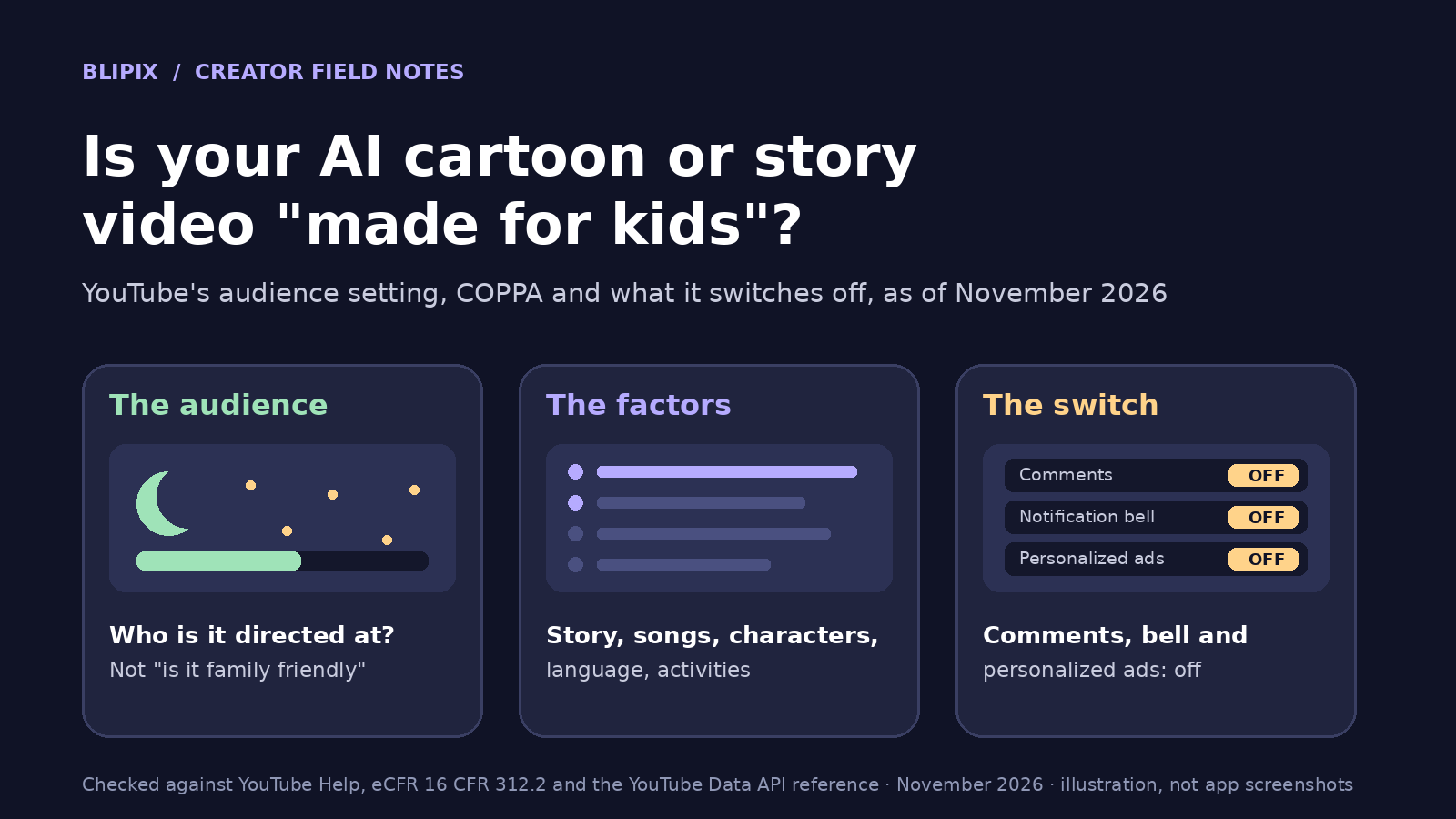
To limit data collection, YouTube needs "to restrict or disable certain features like comments, notifications, and others." A video set as made for kids loses features including:
- Autoplay on home
- Cards or end screens
- Video watermarks
- Channel Memberships
- Comments
- Donate button
- Live chat or live chat donations
- Merchandise and ticketing
- Notification bell
- Personalized advertising
- Playback in the Miniplayer
- Super Chat or Super Stickers
- "Save to playlist and Save to watch later"
A channel set as made for kids also loses Channel Memberships, the notification bell, Posts and Ask Studio. Note the video watermark limit if you brand uploads; see our watermarks article.
On ads, YouTube says: "Not serving personalized ads on kids content may result in a decrease in revenue for some creators who mark their content as made for kids." And "Videos that you set as “made for kids” are more likely to be recommended alongside other kids’ videos." Per the FAQ, they "are not automatically included in the YouTube Kids app."
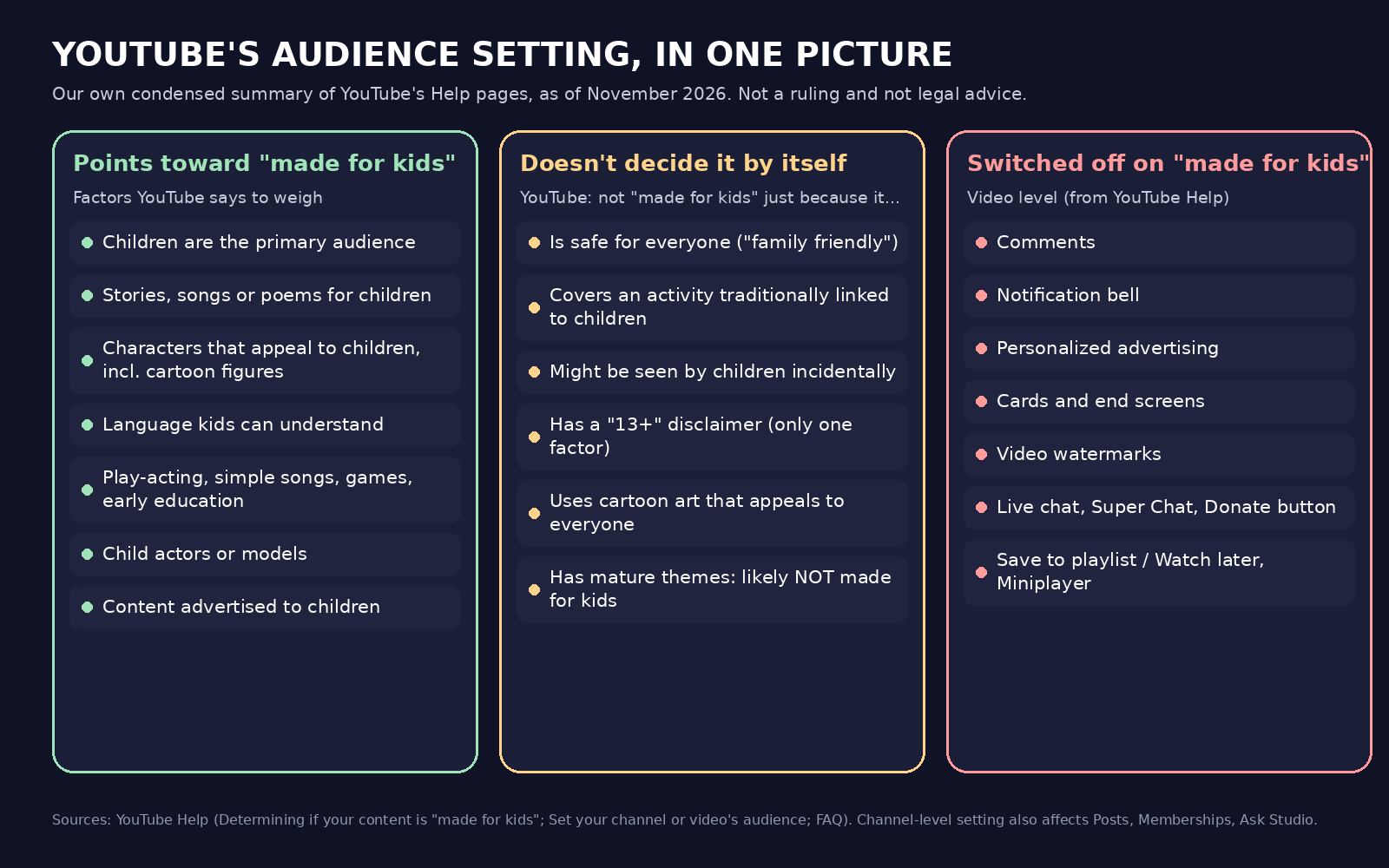
Our own summary graphic, not a YouTube screenshot. Lists are condensed from the linked YouTube Help pages as of November 2026.
YouTube's quality bar for kids and family content
YouTube's best practices for kids and family content "supplement our Community Guidelines" and "apply to both long-form content and YouTube Shorts".
High-quality content is age-appropriate, enriching, engaging and inspiring, with five themes: caring for yourself and others, curiosity and learning, creativity and play, life skills, and showing kids the world.
Low-quality content is heavily promotional, encourages negative behaviors, is deceptively educational, is sensational or misleading (including "keyword stuffing"), or puts familiar characters in inappropriate or risky situations. One entry matters for AI creators: "Hard to follow: Videos that are confusing or make no sense, often due to jumbled storylines, unclear audio, or lack of clear storyline (beginning, middle & end). This type of video is often the result of mass production or autogeneration."
The effect: "If a channel is found to have a strong focus on low-quality “made for kids” content, it may be suspended from the YouTube Partner Program. If an individual video is found to violate these quality principles, it may get limited or no ads."
Our reading: a pipeline posting children's stories on autopilot, unwatched, is where a jumbled plot slips through. If you automate short-form videos, keep a human review step for kids' content, and see our explainer on YouTube's inauthentic content policy.
Where to set the audience in YouTube Studio
At the channel level: Settings → Channel → Advanced settings → Audience, with three options, including "I want to review this setting for every video."
At the video level: choose Audience on the Basic info tab while uploading. For existing videos: Content, select videos, then Edit → Audience → "Yes, it’s 'Made for Kids'" → UPDATE VIDEOS. "Settings for individual videos will override the channel setting." After upload it's labeled "Made for kids - set by you" in your Uploads list.
For tools, the audience page says the audience selection tool will reach third-party apps and the YouTube API "in the near future", and "For now, please use YouTube Studio to upload made for kids content." Yet the YouTube Data API reference already documents status.selfDeclaredMadeForKids: "In a videos.insert or videos.update request, this property allows the channel owner to designate the video as being child-directed." The Help text and the API reference don't line up, so check Audience in Studio after any tool uploads your video. AI disclosure is a separate question (labeling AI-generated videos).
A hypothetical example: the sleepy-owl bedtime story
This is hypothetical, not a real channel and not a Blipix customer. Someone makes a one-minute AI bedtime story: a sleepy owl in picture-book style, a calm narrator. Their tool uploads it automatically as "not made for kids".
The factors (a story for children, child-level language, appealing picture-book characters) point to made for kids in our reading; a 13+ line doesn't settle it. The safest sequence, in our view:
- Open YouTube Studio, find the video under Content and set Audience to "Yes, it’s 'Made for Kids'".
- Decide the channel setting: made for kids if most uploads are like this, otherwise review each video.
- Accept that comments, the notification bell and personalized ads are off on that video.
- Keep future episodes within YouTube's quality themes, with a clear beginning, middle and end.
A six-point checklist before you publish
Our advice. When in doubt, ask counsel rather than guess.
- Who is the video for? Answer in one sentence before you pick the art style.
- Do the factors (story, songs, characters, language, activities) point to children?
- Is the answer the same at the channel level and for this particular video?
- Did you check Audience in YouTube Studio after your tool uploaded it?
- Does the story have a beginning, middle and end, and make sense? Watch it yourself before it goes out; an unattended pipeline won't notice when it doesn't.
- Are you comfortable with comments, notifications and personalized ads being off?
What this means if you use Blipix
Blipix is our product. Its art style picker has a "Kids & Cartoon" filter. As of November 18, 2026, our styles page shows 13 of its 39 styles in that category, including Children Book. We also have pages for music videos for kids and a bedtime story video generator, and both already tell you to mark made-for-kids videos on YouTube.
Blipix doesn't decide your audience or check whether a video is made for kids.
A limitation we're aware of: when Blipix publishes to YouTube, the upload sends the video as not made for kids (selfDeclaredMadeForKids is set to false in our publishing code), and we found no audience option anywhere in our publishing flow. For kids' videos, open YouTube Studio right after Blipix posts and set Audience yourself, or download the MP4 and upload it in Studio yourself. We haven't tested whether an explicit "not made for kids" value sent with an upload overrides a channel-level setting, so check.
Blipix doesn't switch off comments or notifications; YouTube does once you set the audience.
FAQ
Do I have to set "made for kids" even if I don't make kids' content?
Yes. Every creator must set an audience, for the channel or per video, even without kids' content.
Is "family friendly" or a "13+ only" note enough to say not made for kids?
No. "Family friendly" is about safety, not who a video is directed at; the factors decide that. A 13+ disclaimer is one factor the FTC weighs against others.
Can I make cartoon or anime videos that are not made for kids?
Yes. Cartoon art alone doesn't decide it. YouTube lists animated content that appeals to everyone as general audience; mature themes make content likely not made for kids.
What if I set it wrong or YouTube changes it?
YouTube may override your setting in cases of error or abuse; you'll see "Set to Made for Kids" and can appeal. A wrong setting can bring consequences on YouTube and legal consequences under COPPA and other laws.
Can an AI-generated video be monetized if it's made for kids?
YouTube's kids quality principles apply to long-form and Shorts. A channel with a strong focus on low-quality made-for-kids content may be suspended from the YouTube Partner Program, and individual videos may get limited or no ads. YouTube says hard-to-follow videos are "often the result of mass production or autogeneration."