If you post the same short video to TikTok, Instagram Reels and YouTube Shorts, you've probably wondered whether the marks on it matter: another app's logo on a re-upload, your own logo in the corner, the badge an AI tool adds on its free plan, or a tag telling viewers a scene is AI-generated.
The honest answer is less tidy than people hope. No platform publishes how much reach a watermark costs, and we won't invent a number. What the platforms do publish is how they describe these marks, and the descriptions differ enough to be worth reading closely. Below we go through what TikTok, Instagram and YouTube say as of November 2026, then turn it into a workflow and a checklist. We're sticking to marks on the video itself, so this isn't a guide to posting frequency or caption length.
Three kinds of on-screen marks, and why the difference matters
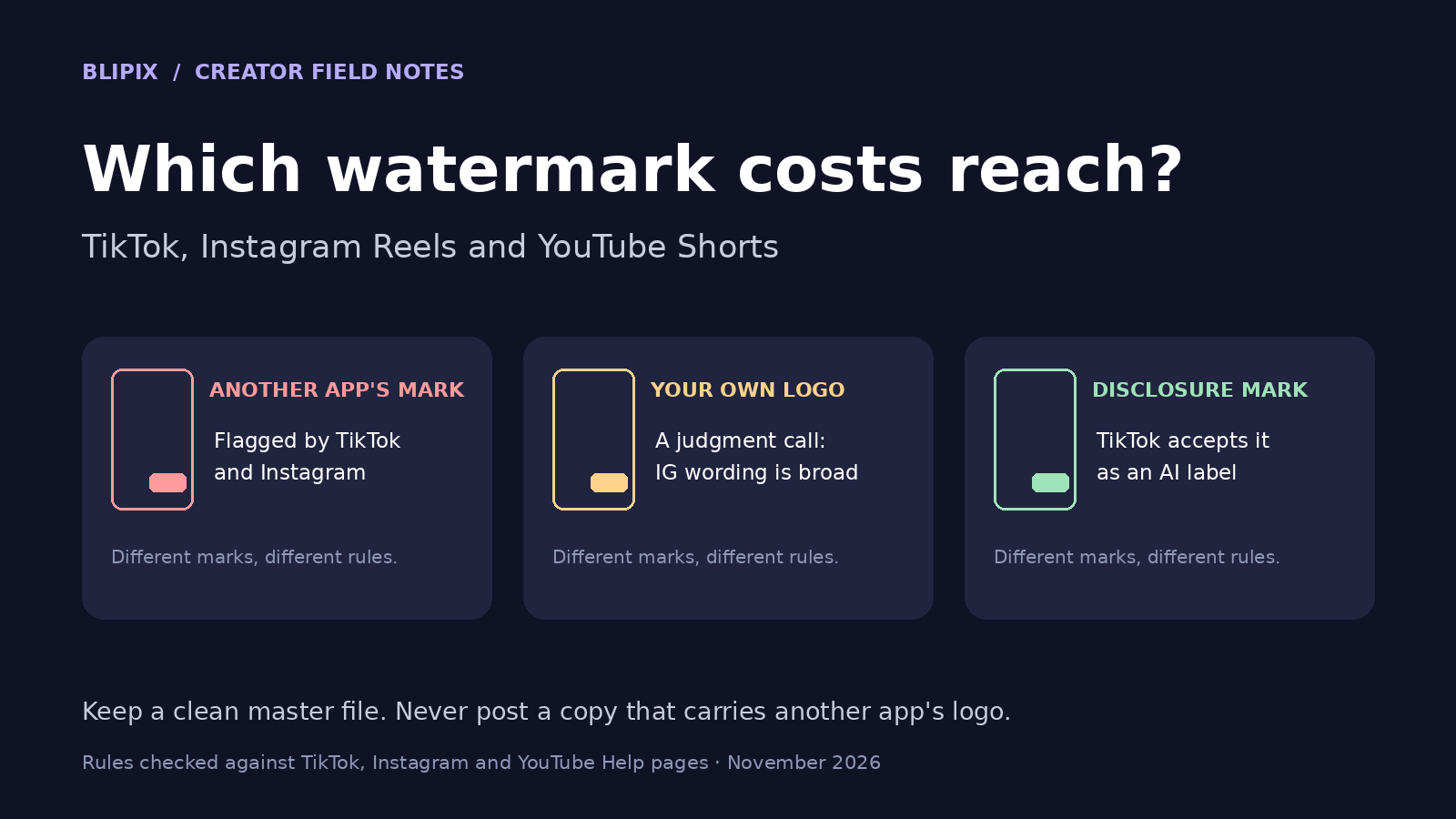
"Watermark" covers several different things. We sort them into three groups, because the platforms don't treat them alike.
Someone else's mark. Another app's logo on a downloaded clip, a creator's handle on footage you didn't make, or the badge an AI tool stamps on free-plan exports. This is the category the platforms name most directly.
Your own branding. Your logo or handle, burned into the file or added by the platform as an overlay. It's yours, but official wording doesn't always separate it from other logos.
Disclosure marks. A caption, sticker or watermark telling viewers how the video was made, for example that it uses AI to show realistic-looking scenes.
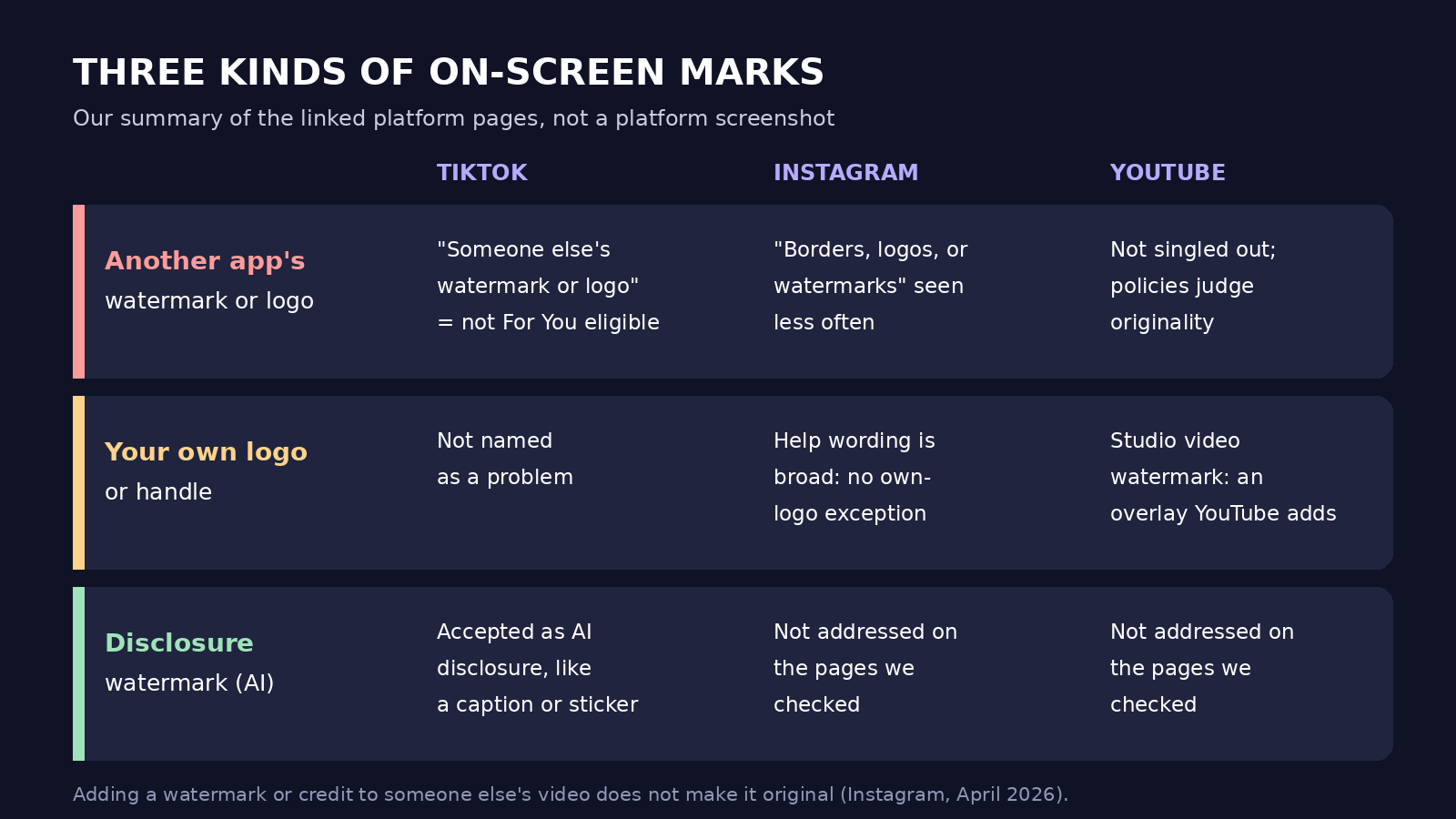 Our own diagram summarizing the TikTok, Instagram and YouTube pages linked in this article, not a platform screenshot.
One thing to say plainly: this is not a guide to removing other people's watermarks. Removing or cropping someone else's watermark doesn't make their content yours, and it isn't what we're recommending. The rules quoted below are about originality, so a clip with the mark cut out is still somebody else's clip. If you work with gameplay or other footage you didn't make, our piece on Reddit story and gameplay videos covers the rights side.
What Instagram says about watermarks on Reels
Instagram is the most direct of the three. Its Help Center page on what kind of reels you may see lists reels you may see less often in recommended places like the Reels tab, Explore and feed. Reels that "Contain borders, logos, or watermarks" are on that list, alongside reels that are blurry or low resolution, mostly covered by text, or not original.
There's no exception for your own logo. So, as our judgment rather than an Instagram rule: if reaching non-followers on Instagram matters to you, keep your own branding small, or test a version without it.
Instagram's creators page on recommendations and originality, from April 30, 2024, points the same way. Describing content eligible for recommendation testing with a small audience first, it gives the example of content that is original, doesn't violate its community guidelines, "has no visible watermarks" and satisfies its recommendation guidelines. When identical content is found, only the original is recommended unless it's been changed significantly, such as narrated with a new voiceover or remixed to react. Accounts that repeatedly post content from other Instagram users without creating or materially enhancing it can be removed from recommendations; Account Status is where you check.
On April 30, 2026, Instagram extended those protections to photos and carousels. Accounts that primarily post unoriginal content are no longer shown where Instagram recommends content, though they can become eligible again when a significant percentage of recent photos, carousels and reels are original over a rolling 30-day period. What doesn't qualify: re-uploading someone else's work "without adding meaningful creative input... such as just adding a border, watermark, subtitles or a credit in the captions." Adding your watermark to someone else's video doesn't make it yours either.
Both pages concern recommendations. Followers still see the accounts they follow.
What TikTok says about watermarks and the For You feed
TikTok's integrity and authenticity guidelines, released August 25, 2026 and effective September 24, 2026, frame this as For You feed eligibility. Ineligible examples include "Reused or unoriginal content posted without creative edits, such as clips that show someone else’s watermark or logo," and content is ineligible "if it includes unoriginal or reused material without anything new."
The wording targets someone else's watermark as a sign of reuse. It doesn't name your own branding as a problem, but we wouldn't read that as permission; it simply isn't addressed. Since the same file usually goes to Instagram too, we'd keep your own mark modest everywhere.
TikTok also explicitly accepts a watermark for disclosure. You must label content that uses AI or significant edits to show realistic-looking people or scenes, using TikTok's AIGC label or your own "clear caption, sticker, or watermark." Small edits like color correction or cropping, artistic styles like anime, and generic text-to-speech narration that isn't a recognizable voice don't need it. Don't strip a required disclosure for a cleaner frame. Labeling itself is covered in our guide to labeling AI-generated videos on TikTok, YouTube and Instagram.
What YouTube says about Shorts, watermarks and reused content
The YouTube pages we checked don't single out other apps' watermarks; they focus on whether the content is original.
The Shorts monetization policies exclude non-original Shorts from engaged views, with examples such as unedited clips from others' movies or TV shows and "reuploading other creators' content from YouTube or other platform." The channel monetization policies define reused content as repurposing material from YouTube or another online source "without adding significant original commentary, substantive modifications, or educational or entertainment value," applied to the channel as a whole. These are monetization rules, and we'll skip the revenue math here. For how they land on faceless AI channels, see our breakdown of YouTube's inauthentic content policy.
For your own branding, YouTube's channel branding help page describes a built-in option: YouTube Studio > Customization lets you add a video watermark "to promote your channel's branding," shown for the last 15 seconds, from a custom start time, or for the entire video. YouTube adds it as an overlay; it isn't burned into your file. The image must be square, under 1 MB and at least 150x150 pixels, it isn't available on videos set as made for kids, and metrics appear in the Subscription source report. One caveat: availability is listed as "landscape view on computers and mobile devices (not clickable on mobile)." The page says nothing more about Shorts, so we wouldn't build your Shorts branding around it.
TikTok, Instagram and YouTube side by side
"Not covered" means the pages we cite don't address it, not that anything goes.
| TikTok | YouTube | ||
|---|---|---|---|
| Someone else's watermark or logo | Named as reused content ineligible for the For You feed | Listed among reels you may see less often | Not singled out; focus is originality |
| Your own logo in the file | Not named as a problem, or as fine | Covered by broad wording, no stated exception | Not singled out |
| Built-in branding overlay | Not covered | Not covered | Studio video watermark, listed for landscape view |
| Disclosure watermark | Accepted, as an alternative to the AIGC label | Not covered | Not covered |
| What the wording affects | For You feed eligibility | Recommendations; followers still see you | Monetization |
| Our cautious default | No third-party marks; keep yours modest | No third-party marks; small logo or none, and test | No third-party marks; consider the Studio watermark |
A cross-posting workflow that keeps stray marks off your videos
A third-party mark can land on your own original video in a mundane way: you post to one app, download your posted copy, and upload it to the next. Downloaded copies can carry the first app's branding, so your video now shows another app's mark.
Our approach is one clean master export, uploaded natively everywhere:
- Export one master from your editor: full resolution, no third-party marks, any required disclosure in place.
- Make variants only from the master, such as an Instagram version with a smaller logo or none.
- Upload natively to each app. Don't re-upload a copy downloaded from another app.
- Use YouTube's Studio watermark if you want branding there, instead of stacking a second logo in the file.
- Check your scheduler. If you automate short-form posting, confirm it uploads your master, not a re-download.
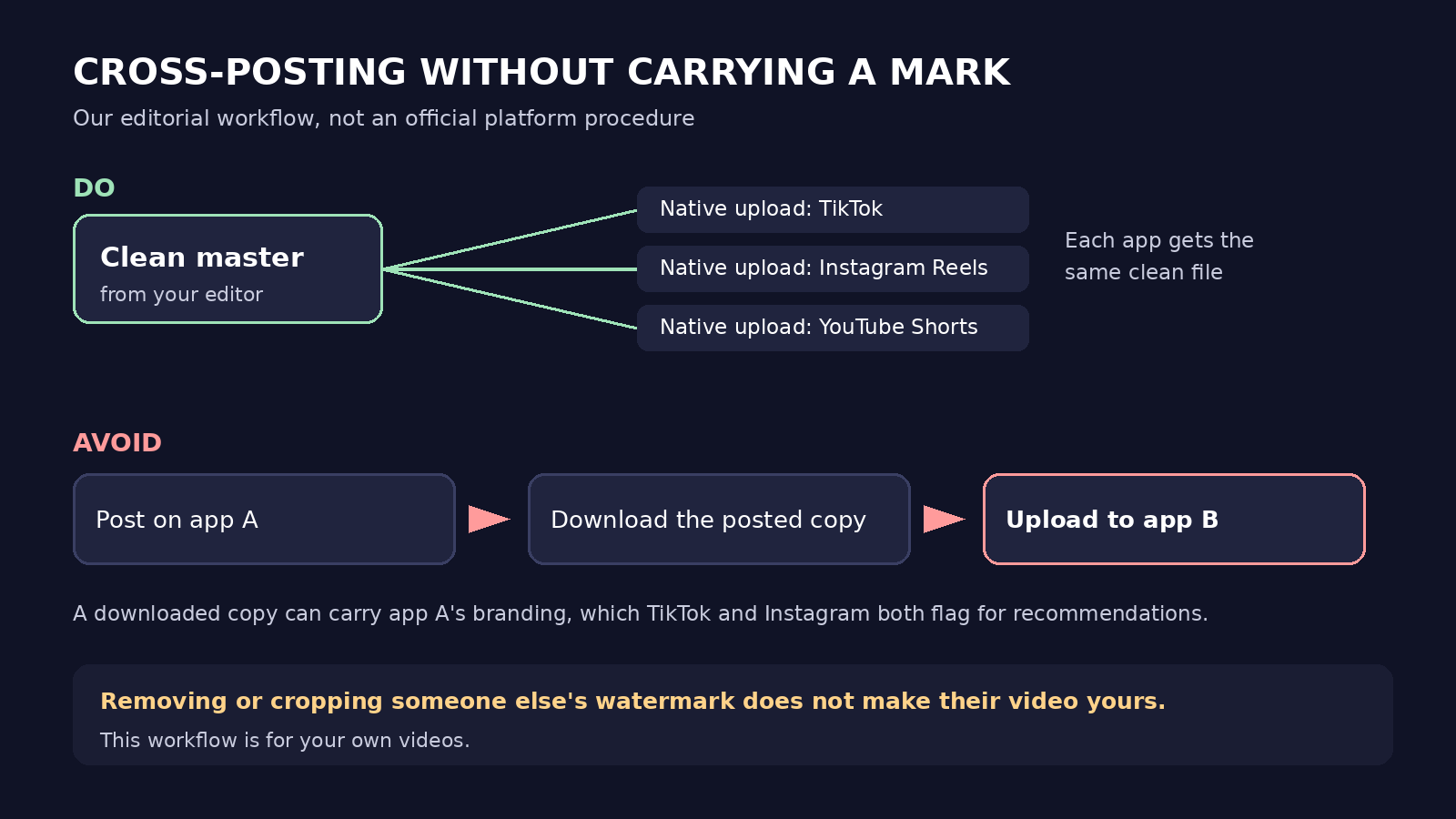 Our own diagram summarizing the linked platform pages and our cross-posting reasoning, not a platform screenshot.
That's editorial reasoning, not a platform rule, but it costs nothing: you keep full quality, avoid importing another app's branding, and decide about your own logo per platform.
Worked example: one faceless video on three apps (hypothetical)
This is a hypothetical we made up to show the decisions involved. It's not a Blipix customer and not a real result.
Dana runs a faceless channel of 45-second history explainers with stock clips, AI-generated visuals, a generic text-to-speech voiceover and burned-in captions. Their first routine:
- Make the video in an AI tool on its free plan, which adds the tool's badge in a corner.
- Put their own logo, fairly large, in the opposite corner.
- Post to TikTok, download the posted copy, and upload that to Reels and Shorts.
- Include one realistic-looking, AI-generated scene of a 1920s street.
The AI tool's badge is someone else's mark, the kind Instagram lists among reels it may show less often. The fix isn't cropping or blurring it; it's exporting from a plan or tool that doesn't add one.
The download-and-reupload step can add another third-party mark: any TikTok branding on the downloaded copy. The TikTok post is unaffected, but the Reels and Shorts versions could show another app's mark. A clean master uploaded natively avoids that.
Dana's own logo isn't named as a problem by TikTok or singled out by the YouTube pages we checked, but Instagram's wording covers logos without exception. So Dana shrinks it everywhere and tries a run of Instagram posts without it. On YouTube, they add the Studio watermark, aware of the landscape-view caveat.
The 1920s street scene needs disclosure on TikTok, via the AIGC label or Dana's own clear caption, sticker or watermark. The generic voiceover, by TikTok's description, doesn't. The disclosure stays on every version.
What happened next? We can't say: Dana isn't real, and we won't invent an outcome. Since nobody publishes what a watermark costs, make the change, keep posting, and compare your own analytics over several weeks. If Instagram recommendations seem to dry up across many posts, check Account Status.
Pre-posting checklist for watermarks and logos
- No other app's logo, handle or watermark anywhere in the frame, including inside imported clips.
- No AI tool free-plan badge on the export.
- You're uploading your master file or a variant of it, not a copy downloaded from another app.
- Your own logo, if any, is small, and you've decided whether the Instagram version carries it.
- Text and branding together don't cover most of the frame.
- The export isn't blurry or low resolution.
- Any required disclosure is present and not cropped out.
- The video is your own work, not someone else's clip with your mark added.
- On YouTube, the Studio watermark is set if you want one.
Where Blipix fits
Blipix is our product, so read this section with that in mind. It's a faceless video generator, and its watermark handling bears directly on this topic.
The free plan lets you generate and preview a 30–60 second video with a watermark: "Created with" plus the Blipix logo near the top of the frame. That's exactly the kind of third-party mark this article warns about, which is why the free plan is for previewing, not posting. Exporting the MP4, removing the watermark and posting need a paid plan, and paid plans export HD with no Blipix watermark.
For your own branding, the editor's Watermark tab lets you add a text or image watermark (uploaded images are kept in a library), choose one of nine positions across the corners, edges and center, and set opacity and size. Given Instagram's wording, we'd keep it small. Paid plans can also post to YouTube, TikTok and Instagram from Blipix, so each app gets the file itself, not a copy downloaded from another app.
None of this guarantees reach or recommendation eligibility; originality and each platform's other guidelines still apply.
FAQ: watermarks and short-form reach
Does my own logo hurt reach on Reels?
Instagram lists reels containing "logos, or watermarks" among those you may see less often, with no stated exception for your own. Nobody publishes how much it matters, so if non-follower reach is important to you, keep it small or test posts without it.
Can I post a video that still shows another app's watermark?
You can, but TikTok treats clips showing someone else's watermark or logo as reused content ineligible for the For You feed, and Instagram may show such reels less often. Upload a clean master instead.
Can I just crop the watermark off a clip I found?
No. Cropping someone else's watermark doesn't make the clip yours, and the originality rules still apply to what's underneath. Use footage you made or have the rights to use.
Will a disclosure watermark hurt my reach?
TikTok explicitly accepts your own clear caption, sticker or watermark as disclosure, or you can use its AIGC label to keep the frame clean. The Instagram pages we cite don't discuss disclosure marks. Either way, don't drop a required disclosure to chase reach.